
ChatPlace for Social Media Managers: Manage All Clients in One Automated Service
It’s 11 PM. You’re still answering DMs.
Five clients. Five different platforms. Instagram for one. TikTok for another. Each expects fast results and “viral content” – ideally by tomorrow morning. Meanwhile, you’re drowning in busywork: content calendars that need updating, comment moderation, funnel tweaks, compiling analytics reports that look nearly identical across accounts.
You became a social media manager to build brands and drive growth.
Instead, you’re a glorified content scheduler burning out on copy-paste tasks.
What Social Media Managers deal with
- Clients want fast results – but quality strategy takes time
- Managing multiple accounts means constant routine work
- Tracking trends across different niches is time-consuming
- Burnout from repetitive tasks: instead of strategy, you drown in day-to-day busywork
- Scaling is difficult without hiring a team
Can you delegate some of this to tools?
Sure. If you don’t mind juggling 10-15 different subscriptions ($200+/month), switching between dozens of browser tabs, and spending your mornings just logging into everything. You’re not delegating – you’re managing a fragmented tech stack. More tools, more tabs, more complexity. Same workload. Here’s the reality check:
What if everything lived in one place?
Not “yet another tool that promises to do it all,” but a system where your content creation, client automation, and sales funnels actually work together – without you acting as the integration layer.
In this article, we’ll break down how ChatPlace helps cover a Social Media Manager’s core tasks in one service: from finding viral ideas and creating content to automating DMs and building revenue-focused funnels.
We’ll show everything through real-world scenarios – useful for freelancers and for those managing corporate social accounts.
Your Competitive Advantage Isn’t Content – It’s Systemization

When managing multiple clients, your biggest enemy is constant context switching.
Every time you open a new service, remember a login, find the right project, set up filters – you lose time and energy. Multitasking is pushed to the extreme. An ecosystem approach solves this radically: all clients, all tools, all data – in one place.
What this looks like in practice
All clients in one dashboard.
Switching between projects in seconds. View analytics, funnels, conversations, and performance data inside a single interface.
One workflow logic across accounts.
Once you learn how to use the tool – you apply it to every client. No need to adapt to different tools.
Pre-built funnel templates.
What used to take a week to set up can now be launched in an hour. The templates are already tested and proven.
Built-in upsell opportunities.
When the tools are at your fingertips, you can offer add-on services: content generation, AI Agents, chatbots, funnels, gamification.
The key advantage for a social media manager: you deliver results faster than your competitors do.
While other specialists spend a week setting up a chatbot, you do it in minutes. While competitors manually monitor trends, you get ready-to-use ideas from Virale. Speed is what clients are willing to pay for.
Virale – Content Generation for Clients

Content creation is one of the most time-consuming parts of a social media manager’s job – especially when you have multiple clients, each working in a different niche.
A typical problem
You have three clients: a local CrossFit gym in Austin, a skincare brand doing $50K/month in revenue from Instagram, a career coach targeting corporate women. For each one, you need to:
- Monitor trends in their sphere
- Find references and ideas for Reels
- Build a monthly content plan
- Write scripts for videos
- Create carousels and feed posts
Before, this meant hours of scrolling, working across multiple AI tools, and constantly switching between tasks.
How Virale solves this problem
Virale is an AI Agent that knows the client’s account: all published content, performance stats, audience characteristics, as well as current niche trends.
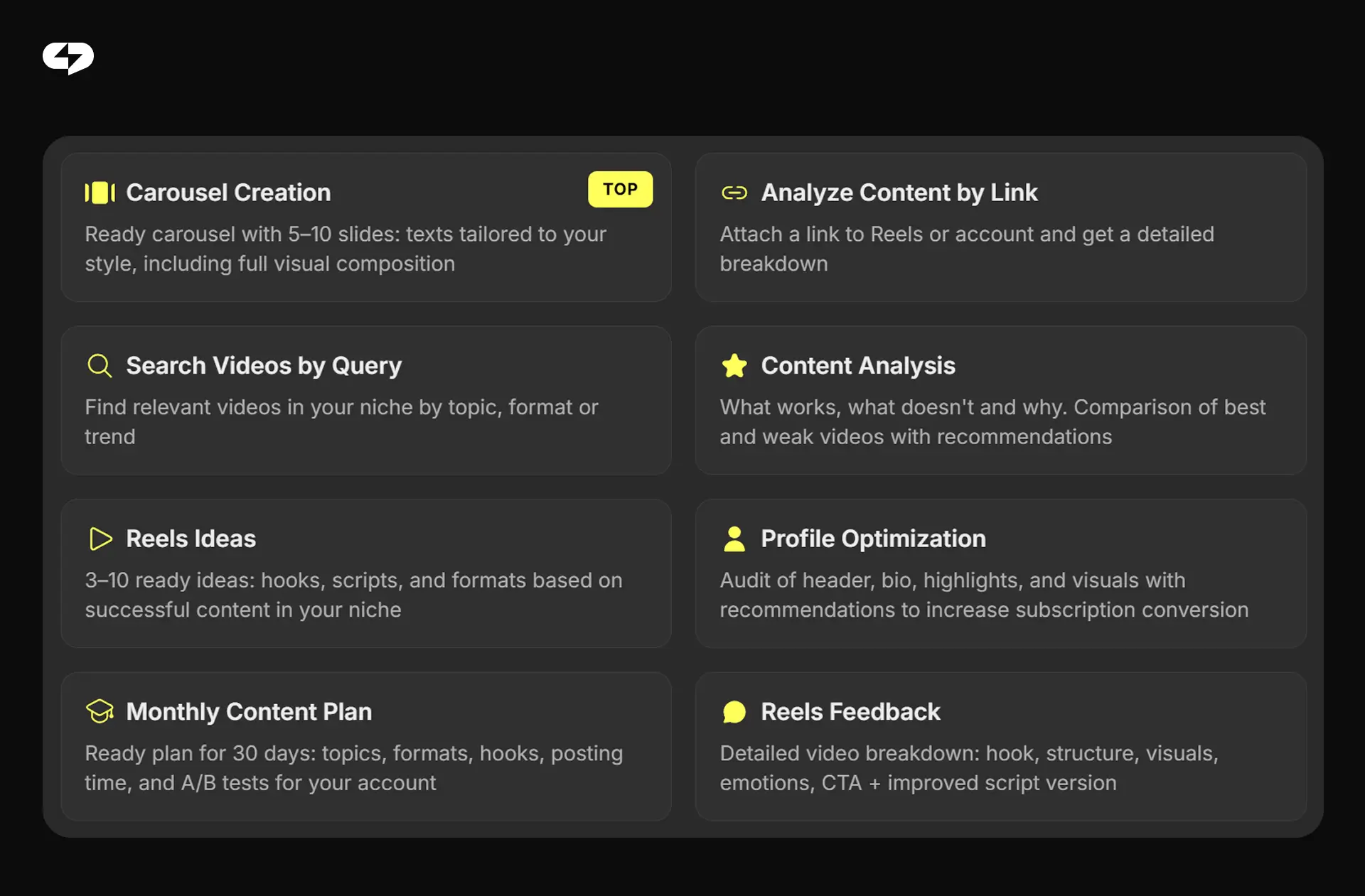
What Virale can do:
- Reels idea research – finds trending videos in the client’s niche, shows what’s working, and suggests ideas you can adapt
- Content analysis – what’s working now, what isn’t, and why; compares top-performing and weaker videos with recommendations
- Content plan creation – a complete 30-day content plan: topics, formats, hooks, posting times, A/B tests
- Script generation – ready scripts with hooks, structure, and CTA based on trends and the client’s style
- Carousel creation – a ready 5–10 slide carousel with text and visual structure
- Profile optimization – audit of the profile headline, bio, Highlights with recommendations to boost conversion
- Reels feedback – a detailed breakdown of a Reel: hook, structure, visuals, CTA plus an improved script version
Learn more: AI Content Creation in 2026: Virale – The Reels Script Generator That Knows Your Account
Example requests you can give the agent
Virale isn’t a basic ChatGPT-style tool where you have to explain context and invent prompts. The agent is already trained: it knows your account, your analytics, your strongest and weakest Reels, your audience. The prompts we spent 6 months building with Anthropic engineers are already integrated into the system.
So, you can describe the task in plain language – like you’re messaging a teammate or assistant:
Content Analysis:
“Analyze my last 10 videos – what’s working best to increase reach?”
“Look at my last Reel – why didn’t it take off?”
Reels Ideas:
“Find trending Reels in my niche”
“What’s trending right now in the healthy eating niche?”
Analyze Content by Link:
“Here’s a link to a competitor’s account: what’s working for them, and how can I use that in my account?”
“Compare this account to mine – what should I adopt?”
Content creation:
“Create a 30-day content plan”
“Here’s a link to a video – write a script in the same style for me”
“Create a carousel about my new product”
Profile Optimization:
“Review my profile – what should I improve for growth and follower engagement?”
One sentence – and Virale delivers an output personalized to your account. No templates, no hours of scrolling, no re-explaining context from scratch every time.
The “Followed” Section.
This feature helps you monitor a client’s competitors. Add accounts to track, get notifications about new videos, analyze growth dynamics. You always know what competitors are doing.
The benefit for a social media manager is clear: one AI Agent – Virale – covers content tasks across all clients.
An AI Agent for DM Conversations
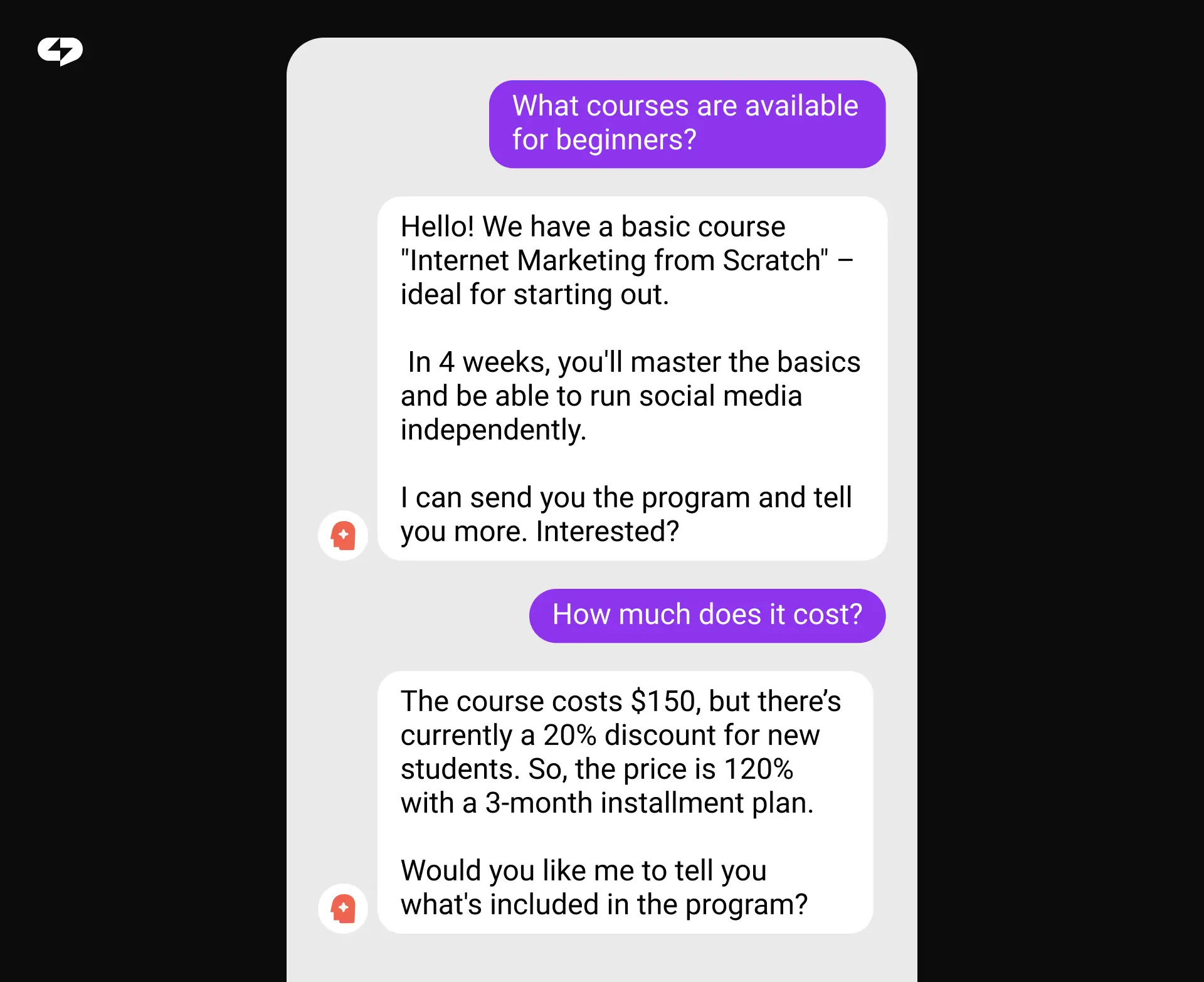
One of the most common client complaints: “We’re losing leads because we just can’t respond in DMs fast enough.” And it’s true – your chance of closing a sale drops dramatically if the reply comes in 1 hour instead of 1 minute.
A typical problem
Your client is an expert or a business owner. They work during the day, relax in the evening, and sleep at night. But DM inquiries come in 24/7. As a social media manager, you can’t sit in every client’s inbox around the clock either. Which means some potential customers are lost.
How the AI Agent solves this problem
The ChatPlace AI Agent isn’t a basic chatbot with canned replies. It’s an intelligent assistant that trains on account data, answers in the client’s tone of voice, and continues improving as it works.
Key capabilities:
- Automatic training – it learns from existing chats, content, and profile data. No need to write complex prompts or scripts
- Replies in your client’s voice – matches communication style, tone of voice, and understands context
- Works 24/7 – responds to DMs, comments, reactions, and Story mentions/tags
- Understands different formats – text, voice notes, video, images, forwarded content
- Knows the client’s products – pricing, features, terms, objection handling – everything you load into it in advance
- Follow-ups – if the person stops responding, the agent nudges and continues the conversation
- Notifications – alerts a manager about important questions that require the involvement of a human
Learn more: Meet the new AI Agent from ChatPlace: how it works and why it’s a game-changer for your business
Set Up in 10 minutes
An important detail: you can set up the AI Agent right from your phone. No programming, no code, no sophisticated prompts. Connect your account, and the agent automatically analyzes your data and starts working.
You can also train the agent further by uploading product info files, writing text comments, or simply dictating instructions by voice. If something changes later or you have new info, you can retrain the agent anytime.
The benefit for a social media manager is clear: set it up once – and your AI Agent works for the client around the clock.
Chatbots and Funnels for Lead Generation

“I need followers and sales”. That is what every client actually wants. Not just pretty content, but measurable results: leads, inquiries, revenue.
A typical problem
A client’s Reel gets 100K views. Sounds like a win! But only a handful visit the profile, even fewer follow, and less than 1% actually make a purchase.
Why? Because between watching a video and buying, there’s a huge gap. You need a system that turns viewers into followers and followers into customers. And paid ads aren’t always efficient (budget constraints, ad policy restrictions or account limits, tracking/privacy changes), so organic growth still requires a structured approach.
How ChatPlace chatbots solve this problem
A keyword-trigger bot
Under a Reel or post, you add something like: “Comment ‘I WANT IT’ and I’ll send you a free guide.” The person comments the keyword, and the bot automatically sends them a DM.
But first, the bot checks whether they follow the account. If they’re not following, it prompts them to follow before delivering the bonus.
What this gives you:
- More comments – the algorithm sees engagement and boosts the content
- Follower growth – people follow to get the bonus
- List building – everyone who comments gets added to your list for future broadcasts
- Automatic qualification – the bot can ask questions and segment the audience
Automated funnels
Chatbots aren’t made just for delivering lead magnets. They can run full sales funnels that guide a person from first touch to purchase.
Common triggers that start a funnel:
- A DM message
- A comment under a post
- A Story mention/tag
- A Story reaction
- Starting the bot via a link
What the bot can do inside the funnel:
- Deliver lead magnets (guides, checklists, promo codes)
- Check follow status before delivering the bonus
- Qualify leads (ask questions, segment)
- Send pricing and product information
- Book a consultation or service
Broadcasts to your list
Everyone who interacts with the bot gets added to your list. You can send broadcasts to that list: announce new products, stay top of mind, send special offers.
The benefit for a social media manager is clear: ready-made funnel templates let you launch a lead gen system for a client in an hour – not a week. It’s a measurable result you can show in numbers. Routine setup no longer eats your time: in ChatPlace, funnels can be copied and quickly adapted for different clients.
Gamification – A Powerful Engagement Tool

Gamification – building game-based mechanics – is one of the top features in ChatPlace.
A typical problem
Reach is down. Followers are passive – they watch Stories, scroll past posts, but don’t react or engage. Comments are low, and the algorithm stops pushing the content.
How gamification solves this problem
Gamification is a points-based system that rewards activity on the profile: likes, comments, Story mentions/tags, friend invitations, answering quizzes.
Possible use cases:
A 7-day contest. Perfect during an active sales period. Usually, when you’re selling, reach drops – people get tired of promo-heavy content. A contest maintains engagement: actions earn points, and top participants win prizes (discounts, free access, promo codes).
A loyalty program. A long-term mechanic for course creators, stores, salons, and service businesses. No “losers” – everyone who reaches a certain number of points gets a reward. Followers return again and again to earn more points.
A referral program. Points are awarded for inviting friends using a unique promo code. Followers bring in new audiences themselves – and it often works better than paid ads.
A quiz bot. An interactive bot that awards points for correct answers. Works especially well for online education – introduces the course topic in a game format.
The expected result: increased reach, audience growth, and passive followers turning into customers.
One Dashboard for All Clients
Modern social media management isn’t just Instagram, although it accounts for 62% of ChatPlace usage. Clients want to show up everywhere. And every platform is a separate tool, a separate workflow, and a separate time cost. ChatPlace provides one dashboard across platforms. You can also manage TikTok accounts, and soon WhatsApp integration will be available.
The benefit for a social media manager is clear: one interface, unified analytics, and savings on time and subscription costs.
How ChatPlace Helps You Scale Without Hiring a Team
The biggest problem for a freelancer or a small agency is the growth ceiling. More clients mean proportionally more work. At some point, it becomes impossible to take one more project without losing quality.
ChatPlace changes the game. The platform takes routine work off your plate, and you focus on what truly requires your expertise.
Comparison: with vs. without ChatPlace
Here’s the reality: every hour spent on manual tasks is an hour you can’t spend landing new clients or building strategy. When you’re juggling five accounts, those hours add up fast.
Let’s break down the actual time difference. This isn’t marketing fluff – these are real numbers based on how long each task takes without versus with ChatPlace.
| Task | Without ChatPlace | With ChatPlace |
| Launching a client funnel | 3-5 days of setup | 1 hour using a template |
| Generating a content plan | Half a day per client | 15 minutes with Virale |
| DM replies | Manual work or hiring an extra team member | AI Agent 24/7 |
| Tracking trends | Hours of scrolling | The agent finds them for you |
| Gamification and contests | No ready tool | Built-in gamification system |
| Managing 5+ clients | 5 separate services | One dashboard |
Quick Start: How to Begin Working with ChatPlace
You can get started with ChatPlace in 15 minutes – no technical skills required. A 14-day free trial is included.
Step 1: Free mini-course
ChatPlace offers a free mini-course that covers all the core features of the platform and also explains how to promote on social media in 2026.
Step 2: Set up your first client
Pick a client you want to offer automation to. Start simple – a keyword-trigger chatbot that delivers a lead magnet.
Setup takes 10-15 minutes right from your phone. There are ready-made templates – you just adapt them to the client.
Step 3: Scale
Once your first client sees results (and they will – comment and follower growth are hard to miss), offer additional services: Virale, the AI Agent, gamification, sales funnels.
In parallel, onboard your other clients – now you know exactly how it works.
A social media manager’s job is a constant balance between quality and quantity. You want to take more clients, but you’re afraid quality will drop. You want to offer new services, but you don’t have time to learn a new tool every week.
ChatPlace solves that dilemma: one platform covers tasks that used to require five different tools. Content creation, DM automation, sales funnels, gamification – everything in one dashboard.
FAQ
How long does it take to learn ChatPlace? I don’t have time to spend weeks onboarding.
15 minutes. Seriously. The platform is built for people who are already drowning in work – there’s a free mini-course that walks you through the essentials, and you can set up your first client funnel from your phone while commuting. No technical skills required. If you can use Instagram, you can use ChatPlace.
What if my client doesn’t trust AI to reply to their customers?
Start small. Set up the AI Agent to handle FAQs only – pricing, hours, basic product questions. The client stays in the loop with notifications for complex inquiries. Once they see it working (faster response times, zero missed leads at 2 AM), trust builds naturally. Most clients care about results, not the tool behind them.
Won’t automation make me replaceable? If the tools do everything, why would clients need me?
The opposite. Automation handles busywork so you can do what clients actually pay for: strategy, creative direction, growth insights. You’re not competing with AI – you’re competing with other SMM managers. The one who delivers results faster wins. ChatPlace lets you take on more clients without burning out or hiring a team. That’s your leverage.
How do I pitch this to a client who’s already skeptical about “another tool”?
Don’t pitch the tool. Pitch the outcome: “I can get your lead gen funnel live in 24 hours instead of next week” or “I can monitor your competitors’ content automatically and flag opportunities.” Show them the template you’ve already built. Results sell themselves. Once they see comment counts double or DM response rates hit 95%, they stop asking about the tool.
What if the AI Agent says something wrong? Who’s responsible?
You control the training. The agent learns from the data you feed it – your client’s tone, product details, objection handling. You can review message history, adjust responses, and set rules for when the agent should hand off to a human. Think of it as a junior team member: you supervise, but you’re not typing every reply yourself.
Can I use ChatPlace for corporate accounts with strict brand guidelines?
Yes. The AI Agent is trainable – you upload brand voice guidelines, compliance rules, approved messaging, and the agent follows them. For corporate clients, you typically set stricter hand-off rules: anything involving legal, pricing changes, or sensitive topics gets flagged for manual review. The agent handles volume (FAQs, booking, basic support), you handle nuance.
My agency uses other tools. Does ChatPlace replace everything, or do I still need them?
ChatPlace replaces: content planning tools, chatbot builders, funnel software, trend monitoring tools, gamification platforms. You’ll still need: a design tool (Canva, Figma), video editing software, and your scheduling platform (though many managers schedule directly from ChatPlace). The goal isn’t to replace every tool – it’s to eliminate tool sprawl so you’re not managing 10+ subscriptions.
How do I measure ROI for the client? They want proof it’s working.
Built-in analytics track: follower growth, engagement rate, funnel conversion, DM response time, comment volume, points earned in gamification. Export these as reports or show them live in the dashboard. Compare month-over-month before/after ChatPlace. Most clients see measurable results within 2-4 weeks: higher engagement, more leads in the funnel, faster sales cycles.