
How to Deliver Freebies on Instagram Without Losing People Along the Way
If your lead magnet delivery still depends on manually replying in DMs, it can quickly become repetitive and hard to keep up with. Instagram comment to DM automation helps you send your guide or free resource automatically, so people get it right away and you don’t have to handle every message yourself.
It also fits the way Instagram works. According to Instagram’s Creator Blog, comment-driven engagement is one of the strongest signals the algorithm uses to decide who sees your content next. This article walks you through the full system – from choosing the right lead magnet idea to setting up the automation to keeping it optimized over time.
A Simpler Way to Get More Reach Than “Link in Bio”
Most creators still think like this: post a Reel, drop a link in bio, hope people click. But Instagram’s algorithm doesn’t reward passive behavior. It rewards interaction – and comments are the highest-value interaction signal you can get.
Every time someone types your trigger word under your post, the algorithm counts it as a real interaction. That pushes your content to more people.
The link-in-bio approach does the opposite. People leave the platform to click your link. The algorithm sees no engagement. Your next post gets less reach because this one looked like a dead end.
There’s also a friction problem. Every extra step between “interested” and “got the lead magnet” loses people. The user reads your caption, thinks “that sounds useful,” goes to your profile, finds the bio link, taps it, lands on a Linktree, scrolls to find the right link, taps again.
By that point, half of them have already moved on. With instagram comment to DM automation, the path is: see post → comment trigger word → get DM with the asset in seconds.
Here’s what the two approaches look like side by side. The table below compares link-in-bio versus comment-to-DM automation across the dimensions that actually affect your growth.
| What You’re Measuring | Link in Bio | Comment-to-DM Automation |
| Algorithm engagement signal | None – click takes user off-platform | High – comment is one of the strongest signals |
| Reach effect on your next post | Neutral or slightly negative | Positive – more engagement = more reach |
| Time to deliver the lead magnet | Depends entirely on you | Instant, 24/7, zero manual effort |
| Steps between interest and delivery | 4-6 taps | 1 action (comment) |
| Subscriber growth per post | Low – most don’t click through | High – every commenter enters your funnel |
| Setup effort | Zero (and the results match) | One-time, ~10 minutes, then runs forever |
The pattern is clear: the comment-first approach builds a flywheel. Each post drives comments. Comments boost reach. More reach means more comments on the next post.
This is the core mechanic behind instagram auto dm from comments – and it’s why creators who use it consistently report faster list growth than anything they tried before. The strategy works because you and Instagram want the same thing: you want more leads, Instagram wants more time-on-platform, and comment-driven DM delivery gives both of you exactly that.
One more thing worth understanding: each post feeds the next. A post that gets 200 comments because of a trigger word gets pushed to a broader audience than a post that gets 20 likes and 3 saves. The next post starts with stronger momentum. Over 60–90 days, creators who use this system consistently see their reach accelerate – not because of any algorithm hack, but because genuine engagement signals genuinely improve distribution.
How to Set Up Lead Magnet Delivery So It Runs Without You
Ready to set it up? Here’s how the full Instagram comment to DM automation works in practice – four phases, from audience research to automated follow-up sequences. Each phase builds on the last, so work through them in order.
Phase 1 – Pick a Lead Magnet Your Audience Actually Wants
Before you automate anything, you need a lead magnet people actually want. That sounds obvious, but most creators skip this step and wonder why nobody comments.
The most common mistake: picking a lead magnet based on what you think is valuable rather than what your audience is actively looking for right now. A PDF you made in 2023 is not a 2026 lead magnet. Your audience has moved on, their questions have changed.
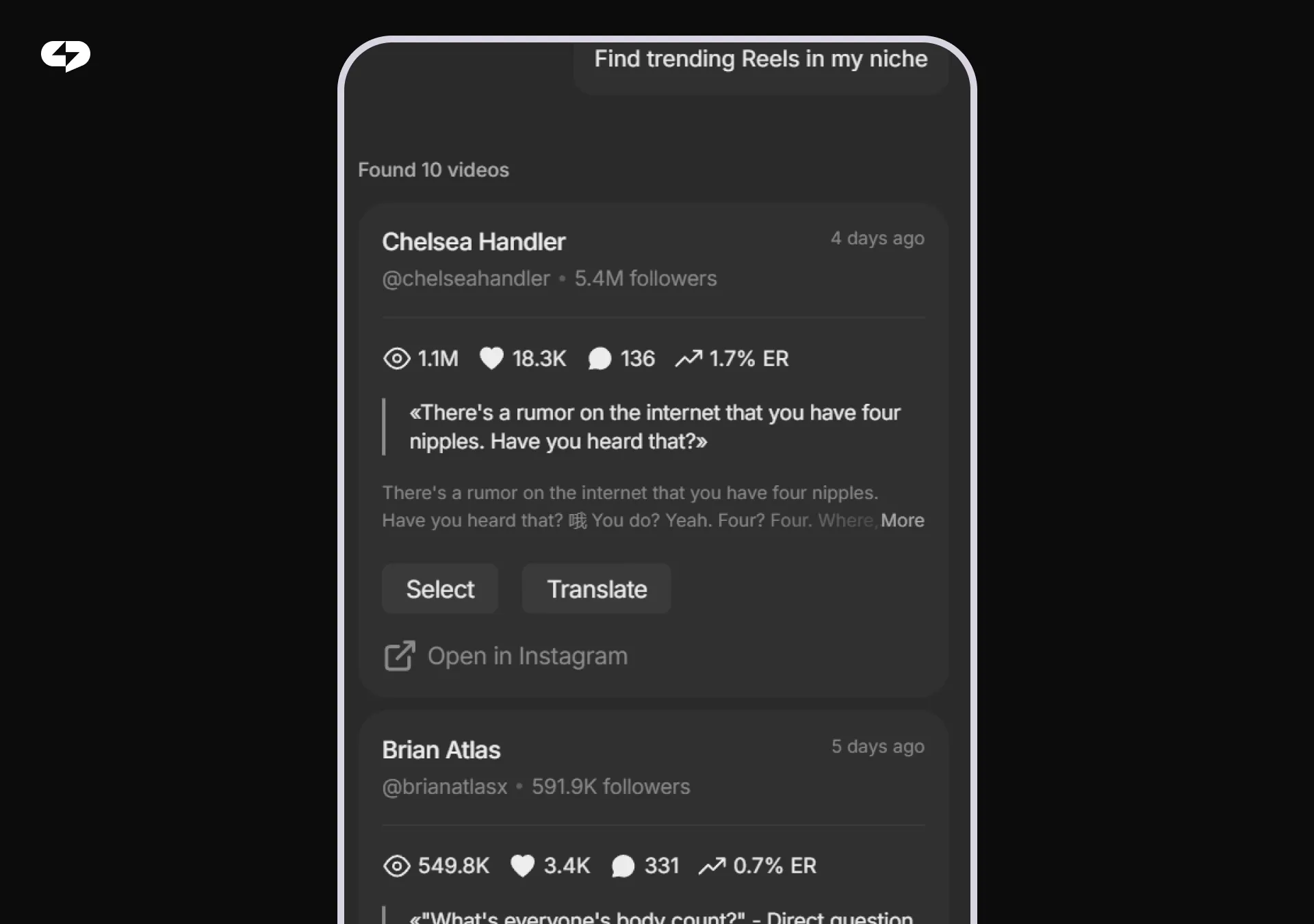
That’s where Virale comes in. Virale surfaces the viral videos inside your niche – so instead of guessing what your audience wants, you look at what’s already working for them this week.
The trick isn’t picking a lead magnet in your head and hoping it lands. It’s reverse-engineering one from content your audience is already engaging with. Here’s the four-step workflow that turns Virale data into a lead magnet idea:
- Pull up the viral videos in your niche. Open Virale and filter for the top-performing content in your segment – the Reels, posts, and videos with the highest reach and engagement right now.
- Filter for high comment activity. Views mean people scrolled past. Comments mean they actually reacted. Sort to see which videos are pulling the most comments per view.
- Read the comments. This is where the lead magnet idea lives. Look for recurring questions (“what time do you wake up?”, “do you have this written down?”, “can you share the template?”), repeated pain points, and phrases your audience uses verbatim. Five to ten videos is usually enough to spot the pattern.
- Shape your lead magnet around the answer. Whatever your audience is repeatedly asking for in those comments – package exactly that. Not a generic version of it. The specific thing they’re literally requesting.
That’s the whole loop: viral videos → high-comment filter → repeated asks → your lead magnet. Skip any of the four steps and you’re back to guessing. Run all four and you end up with a hook your audience has effectively pre-approved.
Once you have your idea, build the actual asset (PDF, slide deck, Notion page, video link – whatever the format calls for) and you’re ready for Phase 2.
Learn more about what Virale has to offer: The Reels Factory. Generate 30 Viral Concepts in 60 Minutes with AI Agents
What makes a great lead magnet for a comment trigger? The best ones deliver a quick win (reader gets a result within 10–15 minutes of downloading), feel specific (not “Instagram Growth Guide” but “The 3-Post Formula That Got Me 4,200 Followers in 6 Weeks”), and naturally lead to a question the reader will want to ask you.
Phase 2 – Choose Your Trigger Word
Your trigger word is the “magic word” your audience types in the comments to receive the lead magnet. It’s the single phrase that kicks off the entire automation.
Good trigger words: GUIDE, PLAYBOOK, SCRIPT, CHECKLIST, FREE, TEMPLATE, AUDIT, PLAN.
Bad trigger words: anything too generic (like “YES” or “WANT”), anything too long (like “SENDMETHEINFO”), or anything confusing that people might misspell.
There’s a secondary benefit to a strong trigger word that most creators don’t think about: social proof. When dozens of people comment “GUIDE” under your post, new viewers scrolling through the comments section see it and immediately understand: there’s something valuable here, and other people are already getting it. That social pressure drives even more comments.
Pro tip: make the trigger word relevant to the post topic, not just the lead magnet. If your post is about Instagram captions, "CAPTION" works better than "GUIDE" – it feels more specific and tied to the content. Keep it uppercase in your CTA too – "Comment GUIDE below" is clearer and more action-oriented than "comment 'guide' below."
Phase 3 – Set Up the Automated Flow in ChatPlace
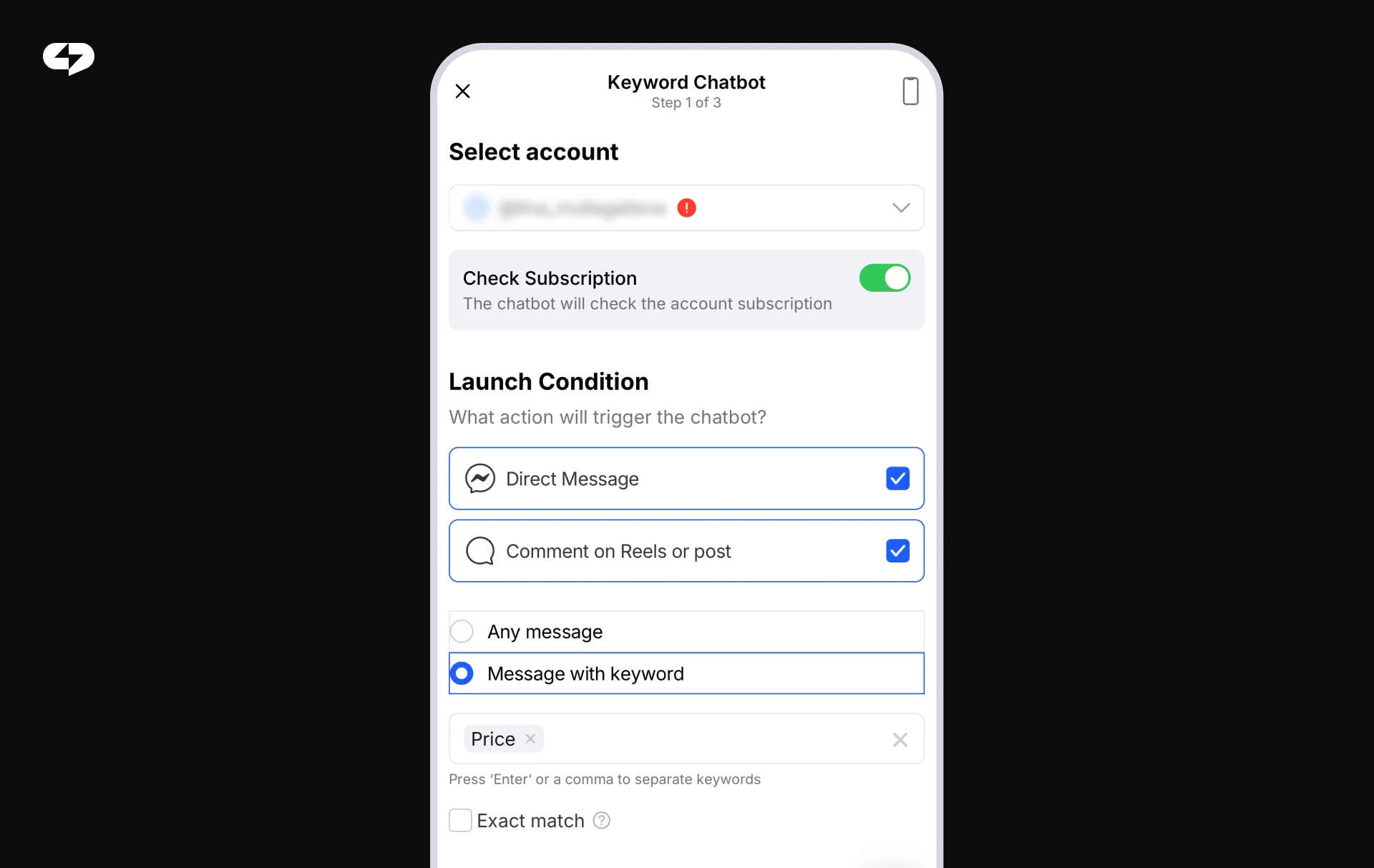
This is the actual automation, and it takes about 10 minutes to configure. Below is the full automation map showing each step, what triggers it, and what happens next.
| Step | What Triggers It | What Happens |
| Trigger detection | User comments your keyword (e.g. “GUIDE”) | Instagram/Meta API detects the comment in real time |
| Subscription check | Comment detected | Bot verifies the user is following your account |
| Delivery (follower) | Subscription confirmed | DM sent instantly with your PDF link, asset, or button |
| Redirect (non-follower) | User not following | Friendly nudge: “Follow us first, then comment again!” |
| Tag applied | Lead magnet delivered | User tagged “Lead – Magnet Received” for later organizing your contacts |
| Follow-up queued | Tag applied | Delayed follow-up message scheduled 22-24 hours later |
As you can see, every step in the flow is fully automated – from the moment someone types your trigger word to the follow-up message that lands in their inbox 24 hours later. You set it up once, and it runs for every lead who comes through, whether you’re online or not.
One technical note worth knowing: Instagram’s Meta platform rules allow only one DM to be sent in direct response to a comment by default. To unlock a full multi-message sequence, your first DM needs to include an interactive button. When the user taps it, the 24-hour conversation window activates – and from that point, your full follow-up sequence can run as planned. ChatPlace automation templates include the button by default for exactly this reason.
You can set the automation to trigger on a specific post, on all posts from a certain date forward, or on your Reels only. If you’re running a campaign tied to a single launch post, use the specific-post setting. If you want the system running on everything you publish, use the “all posts” setting and let it work permanently in the background.
Phase 4 – Automated Follow-Up
The lead magnet is delivered. Now what? Most creators stop here. That’s a mistake – and it’s the step that costs the most leads.
Think about what happens when someone downloads your guide: they have it. They might read it. They might not. But they don’t have a reason to come back to your DMs unless you give them one. Twenty-four hours later, most people have forgotten where they got it.
The follow-up message changes that entirely. Set a delayed message – 22 to 24 hours after delivery – with a simple, low-pressure check-in: “Hey! Did you get a chance to look at the guide? Happy to answer any questions or help you apply it to your situation.”
This message re-opens the conversation naturally, without feeling like a sales push. It shows you actually care about the result. And it creates the moment where the person can tell you what’s on their mind – which is exactly the opening you need to take the relationship further. Set it once in ChatPlace. It runs automatically for every lead who goes through the flow.
How to Keep Your Lead Magnet Fresh and Comments Flowing
Setting up a comment-to-DM flow once is good. Keeping it fresh – connected to what’s actually trending – is what separates creators who consistently grow from those who plateau.
Here’s the problem with a static lead magnet: the interest wears off. An “Instagram Growth Guide” that felt urgent in January feels generic by April. Fewer people respond. You might assume the strategy stopped working – but what actually happened is the offer got stale.
The fix is to check which videos are blowing up in your niche every 4–6 weeks and refresh your lead magnet angle – without rebuilding the whole automation from scratch. The infrastructure stays the same. Only the hook changes.
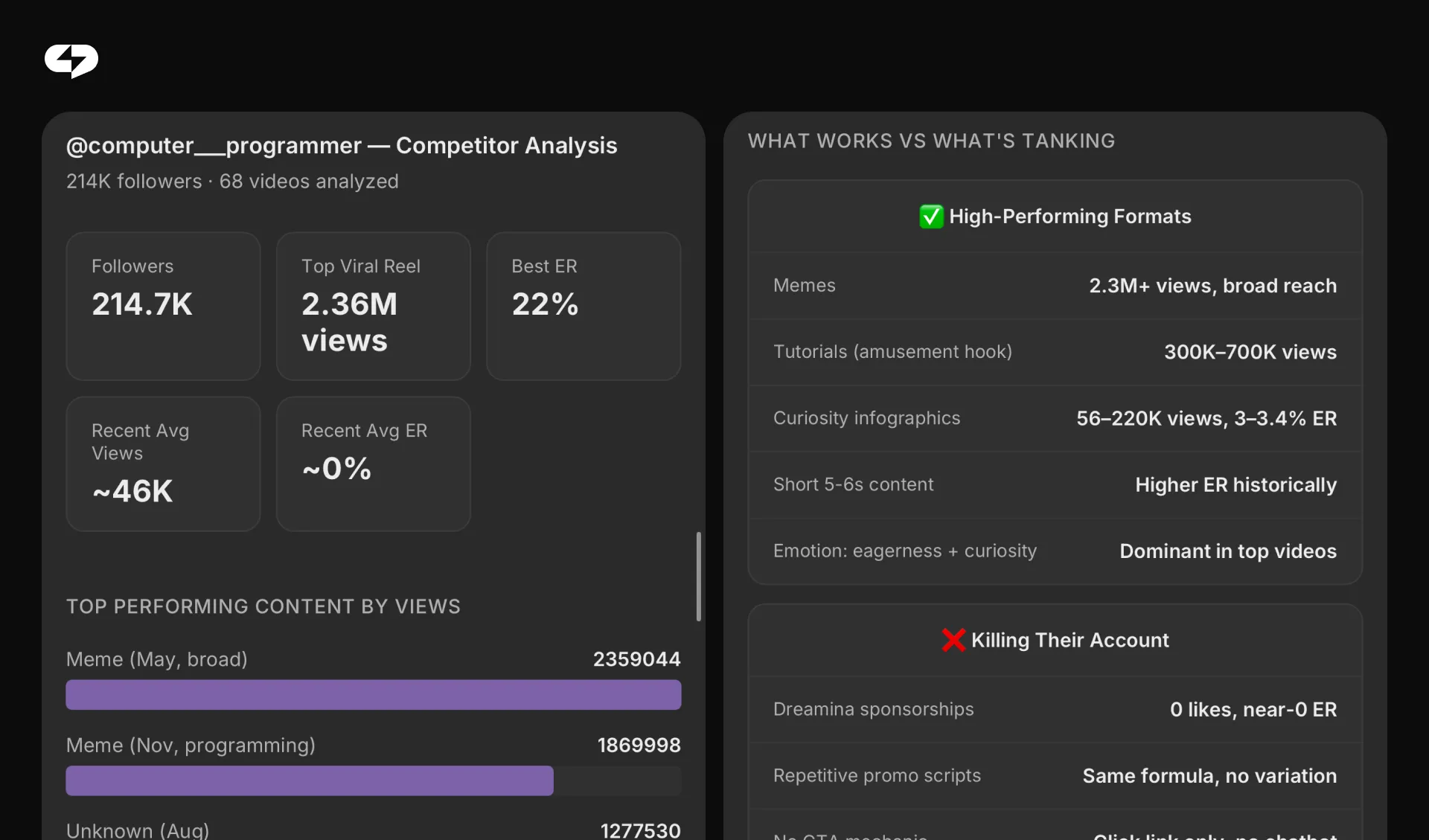
See what’s winning in your niche this week. Open Virale and scan the top-performing videos in your segment – the formats, topics, and hooks getting real engagement right now, not last quarter. Read the comments under them. That’s where your audience tells you exactly what they want next.
Update your trigger word or post CTA to match. If “audience retention” is trending for video creators this week, change your CTA from “Comment GUIDE for my growth playbook” to “Comment RETENTION for the exact framework I used to 3x my watch time on Reels.” Same automation. New angle. Immediately more urgent and relevant.
You’ll start seeing more people move from comment to DM. A fresher offer tied to a trending topic will consistently outperform an evergreen one. More comments = more reach = more leads = more conversations with people already interested.
Learn more: How to Build an AI Agent That Sells in Your DMs 24/7 (Step-by-Step Setup Guide)
Don’t Get Banned: 3 Rules for Safe Instagram Automation in 2026
Automation done right is completely within Instagram’s official API guidelines. Automation done recklessly gets your account flagged. Follow these three rules and you’ll never have a problem. The table below covers the safety rules every creator should know.
| Rule | What It Means in Practice | Why It Matters |
| Use official API tools only | ChatPlace operates through Meta’s approved API. Never use tools that simulate browser behavior or scrape data. | Third-party scraping violates Meta Terms of Service and can trigger permanent bans |
| Vary your comment auto-replies | Set at least 10 different versions (e.g. “Check your DMs!”, “Sent! Look for my message”, “Your guide is on its way!”) | Instagram’s spam detection flags identical repeated comments – varied replies keep you safe |
| Respect the 24-hour messaging window | Once the user taps your interactive button, send follow-ups within 24 hours. After that, Meta requires a message tag. | Messaging outside the window violates Meta’s Platform policy and can suspend your automation |
Following these three rules means your automation runs cleanly, indefinitely. Most creators who report «my automation stopped working» are hitting one of these three rules — usually the 24-hour window.
The fix is built into ChatPlace templates: the interactive button in the first DM opens the window, and follow-ups are scheduled inside it by default. Set it up correctly once and you won’t touch it again.
Stop Working for Your Instagram – Make It Work for You
Every day you spend manually replying “Sent!” to DMs is a day your automation could have handled 50 leads while you were doing something else. Every static link in bio is a missed comment, a missed algorithm signal, a missed lead.
Set up the trigger once. Use Virale to keep your lead magnet ideas sharp and your hooks tied to what’s trending. Watch your list grow on autopilot.
FAQ
What is Instagram comment to DM automation?
Instagram comment to DM automation is a system where a bot detects a specific keyword in a comment on your post and automatically sends that person a direct message. The message typically delivers a lead magnet – a free guide, checklist, template, video, or link. The whole process happens in seconds, without any manual action from you, 24 hours a day. Here’s exactly how to automate lead magnets instagram creators use to turn comments into subscribers.
How do I automate lead magnets on Instagram without getting banned?
Use a tool that connects through Instagram’s official Meta API – like ChatPlace. Avoid any service that uses browser automation or third-party scraping. Rotate your comment auto-replies (use at least 10 different wordings), and follow Meta’s 24-hour messaging window rules when sending DM sequences. Following these practices keeps your account fully compliant and safe long-term.
Does using comment triggers actually improve my Instagram reach?
Yes. Every comment your post receives sends a positive engagement signal to Instagram’s algorithm. When your CTA encourages followers to comment a trigger word, you’re generating high-quality, intentional engagement – the kind the algorithm specifically rewards with broader content distribution. More comments lead to more reach on that post.
How long does it take to set up a comment-to-DM automation in ChatPlace?
About 10 minutes for a basic flow. Connect your Instagram account, select the keyword comment automation template, enter your trigger word, paste your lead magnet link or upload your PDF, and activate. The flow handles subscription verification, instant DM delivery, tagging, and follow-up scheduling automatically from that point forward.
What happens if someone comments my trigger word but isn’t following me?
The automation includes a subscription check by default. If the user isn’t following your account, the bot skips the delivery and sends a friendly redirect instead – something like: “Follow us first and then comment again to get your free guide.” This means your automation simultaneously grows your follower count and protects your lead magnet from being accessed by non-followers.
What is a good trigger word for instagram auto dm from comments?
The best trigger words are one word, all caps, clearly tied to the offer, and easy to type without mistakes. Top performers: GUIDE, PLAYBOOK, TEMPLATE, FREE, CHECKLIST, SCRIPT, AUDIT, PLAN, TOOLKIT. Avoid vague words like “YES” or “SEND” – they don’t tell viewers what they’re getting, which reduces comment rates.
Can I send a full DM sequence from a comment trigger, not just one message?
Yes – with one extra step. Instagram’s Meta API allows only one DM in direct response to a comment by default. To unlock a full sequence, your first DM needs to include an interactive button. When the user taps it, the 24-hour conversation window opens, and from that point your full sequence runs as planned. ChatPlace automation templates include this button by default.
How often should I refresh my lead magnet to keep conversion rates high?
Every 4-6 weeks is a good baseline, or whenever you notice your comment rate dropping on trigger-word posts. Use Virale to check what’s trending in your niche before each refresh. You don’t need to rebuild the entire lead magnet – updating the title, the hook, and the first page is often enough to make it feel current and drive a new wave of comments.
Does instagram comment to DM automation work for Reels?
Yes. ChatPlace’s comment trigger automation works on regular feed posts, Reels, and even during Instagram Live broadcasts. Reels tend to generate the highest comment volume because of their broader distribution, making them especially effective for this strategy.

Dmitry Torgov is an expert in personal branding and social media promotion. Co-founder of ChatPlace.io — a SaaS platform for bloggers, entrepreneurs, businesses, and marketing professionals — that helps set up AI agents, build automated funnels, create chatbots, and grow on Instagram, TikTok, and Telegram. Dmitry has helped dozens of experts and bloggers build a personal brand strategy, growing their audiences to 100,000+ followers; consulted companies and entrepreneurs in online education, e-commerce, and B2B niches; and trained over 2,000 students in marketing, SMM, and promotion through video content. “Personal branding is not about views, likes, or quick hype. Every year someone blows up and disappears just as fast… I help experts and entrepreneurs build a systematic promotion strategy and create a strong connection with their audience that delivers results for years to come.”