
Video script template: Copy this 30-second reel structure
A video script template for a 30-second Reel splits the clip into 5 beats: a hook in the first 3 seconds, the problem by second 8, the value, the payoff and a call to action in the last 4 seconds, about 75 words in total. Below are the template with timing, 3 filled-in examples and common mistakes, for creators, coaches and small businesses who film their own Reels.
Why a 30-second Reel needs a script
A script keeps a short video to one idea and puts the important lines where viewers are still watching. Instagram names the chance that you watch a Reel all the way through as one of its most important predictions for Reels, according to its ranking explainer from 2023.
At a relaxed pace of about 150 words a minute, 30 seconds hold around 75 spoken words: enough for one problem, two or three points and a single ask.
Example: a dog trainer films a tip about loose-leash walking without notes and ends up with 55 seconds, including a 10-second introduction. With a script, the same tip fits in 29 seconds and opens on the dog pulling. A script is one lever among several, and our guide on how to get a lot of views on Instagram Reels covers the rest.
The 30-second video script template
The template splits 30 seconds into 5 beats, each with a time slot and a word budget.
| Time | Beat | What to write | Spoken words |
|---|---|---|---|
| 0–3 s | Hook | the result or problem in one line, plus 3 to 5 words on screen | 6–8 |
| 3–8 s | Setup | why it matters to the viewer and what the problem costs them | 10–14 |
| 8–22 s | Value | 2 or 3 points, one sentence and one shot each | 30–35 |
| 22–26 s | Payoff | the finished result or the proof | 8–10 |
| 26–30 s | Call to action | one ask: comment a word, save or follow | 8–10 |
Copy the fill-in version and replace the brackets:
- Hook: “[Result] in [time or number].” On screen: [3 to 5 words].
- Setup: “Most [audience] [common mistake], so [what it costs].”
- Value: “First, [step]. Then, [step]. Last, [step].”
- Payoff: “[Show the result]. That took [time or number].”
- Call to action: “Comment [WORD] and I’ll send you [resource].”
Read the draft aloud with a timer before you film. If it runs past 30 seconds, cut words from the value beat first.
How to write the hook: The first 3 seconds
The hook is everything a viewer sees, hears and reads before second 3, and it decides whether they stay for the setup. Write it last, once you know what the Reel delivers.
Most hooks fall into 4 types:
- Bold claim: “You’re watering your plants too often.”
- Visible result: the finished thing in the first frame, with the time or cost on screen.
- Relatable scene: a familiar moment, like stepping on a toy in the dark.
- Direct question: “Do you still write captions at midnight?”
Write 3 versions of different types and pick the one you’d stop for yourself. Make the on-screen text work with the sound off, since plenty of people scroll muted. Skip greetings and introductions, because “Hi, I’m Anna and today…” spends the most valuable seconds on nothing. For more lines to start from, see our list of 300 hooks for your videos.
How to write the body: Setup, value and payoff

The body runs from second 3 to second 26 and delivers what the hook promised. Keep it to one idea: if you notice two, save the second for the next Reel.
- Setup (3–8 s). Name the problem and its cost in one or two sentences, so the viewer decides early that the Reel is about them.
- Value (8–22 s). Give 2 or 3 points, one sentence each, and change the shot with every point.
- Payoff (22–26 s). Show the result the hook promised: the clean desk, the finished cake, the room before and after. If there’s nothing to show, end the value on the most concrete point.
Put the payoff before the ask, because people rarely act on a promise that hasn’t paid off yet. To see how hits in your niche time these beats, use our guide on how to analyze a viral Reel.
How to write the call to action: One ask in the last 4 seconds
The call to action asks viewers to do one thing in the last 4 seconds. Match the ask to the Reel: a checklist earns a save, a series earns a follow, and a free resource earns a comment with a code word.
A “comment a word” ask works when the resource arrives fast. Instagram comment automations send a DM as soon as the keyword appears under the Reel. Instagram allows one private reply to a comment, so make that first message a short card with a button and send the link after the tap.
Write the code word in capitals on screen and say it out loud, for example “Comment PLAN and I’ll send you the 7-day plan.” The button below gives you 14 days of Pro free to set up your first comment-to-DM flow.
3 video script examples you can copy
These 3 filled-in scripts come from different businesses. Each one stays under 75 spoken words, so it fits 30 seconds at a natural pace.
| Beat | Fitness coach | Bakery | Real estate agent |
|---|---|---|---|
| Hook (0–3 s) | “Sitting all day is why your back hurts.” On screen: “3 stretches, 2 minutes” | “Why this bread takes 36 hours.” On screen: the crust cracking | “3 photos that make buyers skip your listing.” On screen: a dark living room |
| Setup (3–8 s) | “Eight hours at a desk tighten your hips and pull on your lower back.” | “Fast dough rises in two hours, and you can taste the shortcut.” | “Buyers decide in seconds, and weak photos cost you viewings.” |
| Value (8–22 s) | “First, a hip flexor stretch. Then, cat-cow. Last, a seated twist, 30 seconds a side.” | “We mix it on Monday, fold it four times and let it rest overnight in the cold.” | “One, a dark room. Two, a cluttered counter. Three, a toilet seat left up.” |
| Payoff (22–26 s) | A client standing up straight, timer at 1:58 | A sliced loaf with an open crumb | The same room, bright and tidy |
| Call to action (26–30 s) | “Comment BACK for the full routine.” | “Follow us for Saturday’s bake list.” | “Comment PHOTOS for my pre-listing checklist.” |
For product videos filmed in a creator’s style, our guide to AI UGC video scripts covers unboxing, tutorial and review formats.
Common mistakes in short video scripts
Most weak scripts fail in the same few places. Check your draft against this list before you film:
- An introduction before the hook. Your name and the topic can go in the caption.
- Two ideas in one Reel. The viewer remembers neither, so split them into two videos.
- Sentences written for reading. Long sentences with commas sound stiff when spoken. Keep most lines under 12 words.
- No payoff. The hook promises a result and the Reel ends before showing it.
- Three asks at once. “Like, follow, comment and share” gives the viewer four tasks and no reason to do any of them.
- On-screen text that repeats every word. Short phrases and numbers support the speech, while full subtitles are a separate layer.
Then read the script to someone outside your niche and ask them to repeat the main point in one sentence.
How to write a Reel script faster with AI
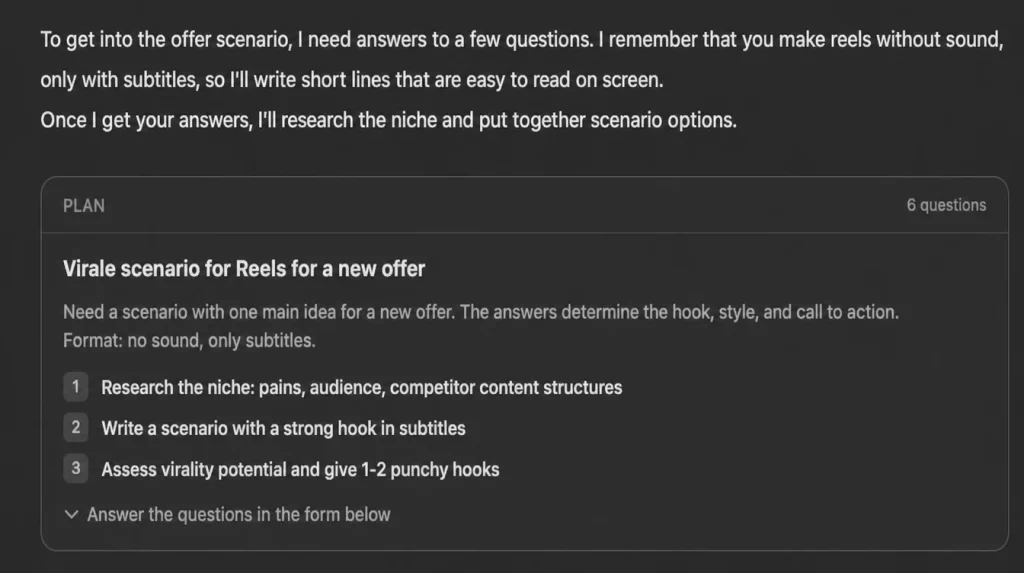
You can draft a Reel script in minutes in the AI creator chat in Virale. The chat has ready-made scenarios: one writes a shoot-ready Reel script with a hook, another builds a bank of 20 to 30 hooks for your niche.
- Open a scenario. Type “/” in the chat to search the list, or pick the Reel script scenario from the catalog.
- Give context. Name your niche, your audience, the result the Reel promises and your code word.
- Ask for options. Request 3 hooks of different types and a 30-second version of about 75 words.
- Borrow a structure. Paste links to Reels that took off in your niche and ask to rewrite their structure for your topic.
In the Reel scenarios, the agent pulls code words from your active comment automations into the call to action, so the ask matches the flow that sends the DM. Once you’ve filmed footage with speech, video editing assembles a vertical Reel from it: it transcribes the speech, cuts pauses and adds subtitles, music and B-roll where your footage runs short.
Script generation spends AI credits, so it runs on Creator at $45 a month with 2,500 credits, on Premium and on the Creator trial with 500 credits, as the pricing page shows.
Key takeaways
- A video script template for a 30-second Reel has 5 beats: hook, setup, value, payoff and call to action.
- Budget about 75 spoken words and read the draft aloud with a timer.
- Keep one idea and one ask per Reel, and show the payoff before the ask.
- Next step: fill in the template for your next Reel and write 3 hook versions before you film.
FAQ
How long is a 30-second video script?
A 30-second video script is about 75 spoken words, based on a relaxed speaking pace of around 150 words a minute. Fast talkers fit 90 words, while a calm explainer with pauses fits closer to 60. The template gives the hook 6 to 8 words, the setup 10 to 14, the value 30 to 35, the payoff 8 to 10 and the call to action 8 to 10. Reels with no speech follow the same timing, with on-screen text in place of spoken lines. Example: a nutritionist writes 110 words for a 30-second Reel, reads it aloud and gets 44 seconds. She cuts the third tip and two adjectives and lands at 76 words and 30 seconds. Always time the draft out loud, since words on paper look shorter than they sound. If a script still runs long after cutting, split it into two Reels and keep your delivery calm.
How do I write a video script for Instagram Reels?
To write a video script for Instagram Reels, start with the payoff, then write the value, the setup, the call to action and finally the hook. Working backwards from the result keeps every line pointed at the promise. Write in short spoken sentences, read the draft aloud with a timer and trim it to about 75 words for 30 seconds. Then plan one shot per value point, so the visuals change as often as the ideas do. Example: a florist starts from the payoff, a finished bouquet that costs a third of the shop price. Then she writes 3 steps, a setup about overpriced bouquets and a hook built on the price gap. If you’re adapting a Reel you admire, get the transcript of the Reel first and rewrite its structure in your own words. Film 2 takes of the hook, because it’s the line most worth testing.
What is a good video script example for a small business?
A good video script example for a small business shows one result from the business in 30 seconds and ends with one clear ask. The strongest topics come from questions customers already send you: prices, timing, how something is made and what to choose. Turn each question into a hook, answer it in 2 or 3 points, show the result and invite the next step. Example: a dry cleaner gets asked about wine stains every week. The script opens on a stained white shirt with the text ‘Red wine, 48 hours old’, explains why hot water sets the stain, shows 3 steps and ends on the clean shirt with ‘Comment STAIN for the full guide.’ The 3 filled-in scripts above follow the same pattern for a coach, a bakery and a realtor. Keep a list of customer questions and turn one into a script each week, so you never start from a blank page.
Should I read my script word for word on camera?
You don’t have to read your script word for word on camera, and most creators sound more natural when they don’t. Learn the hook and the call to action exactly, because those lines carry the most weight and need precise timing. For the value, keep short bullet notes and say each point in your own words. A teleprompter app helps if you prefer reading, as long as you look at the lens and keep the text close to it. Example: a tax consultant memorizes the hook ‘You can still lower this year’s tax bill’ and the ask, then talks through 3 deductions from notes. Her delivery sounds like advice to a client, and the timing stays close to 30 seconds. Record the hook 3 times and keep the take with the most energy. Time the full take again after filming, since speaking freely often adds a few seconds.
Can I use the same script for TikTok and YouTube Shorts?
Yes, you can use the same script for TikTok and YouTube Shorts, since all three are short vertical videos with the same parts: a hook, a body and a call to action. Keep the beats and adjust the details for each platform. Check the call to action first: a ‘comment a word’ ask needs an automation that runs on that platform, and a ‘link in bio’ ask depends on how each profile is set up. On-screen text may need to move, because each app places its buttons and captions in different spots. Example: a language tutor posts one 30-second script on Reels with ‘Comment WORDS for the list’ and on TikTok with ‘Follow for part 2’, because her comment automation is set up on Instagram. Watch the first 3 seconds on each platform separately, since the same hook can hold viewers differently. Note which version keeps people longer and reuse that hook.
Do I need a script for a Reel without talking?
Yes, a Reel without talking still needs a script, written as on-screen text and shots in place of spoken lines. Use the same 5 beats: a text hook in the first frame, a short setup, 2 or 3 points shown on screen, the payoff and a written call to action. Keep each text card under 8 words and leave it on screen long enough to read twice. Plan the shots as carefully as the words, since the visuals carry the whole message. Example: a ceramics studio films a mug from clay to glaze with no voice. The script lists 5 shots, 4 text cards from ‘Day 1: wedging the clay’ to ‘Day 9: out of the kiln’ and the ask ‘Comment MUG for class dates.’ Add trending audio only if it fits the mood of the clip. Test the Reel with the sound off before posting, because many viewers will see it that way.
How many scripts should I write at once?
Write 3 to 5 scripts at once, which is enough for a week of Reels and short enough to keep each one sharp. Batching saves setup time: you pick the shots, the outfit and the light once and film several videos in one session. Start each batch from a list of customer questions or from Reels that worked for you before. Example: a personal stylist writes 4 scripts on Sunday, each answering one client question, and films them in 90 minutes on Monday. After posting, compare the Reels by watch time and note which hook types hold viewers. Our guide on how to see Instagram insights shows where to find watch time and reach for each Reel. Keep the scripts in one document with the date and the result, so your next batch starts from what already worked.
Can AI write a Reel script for me?
Yes, AI can write a Reel script for you: in the AI creator chat in Virale, a ready-made scenario returns a shoot-ready script with a hook, and another builds 20 to 30 hooks for your niche. The result depends on the context you give: your niche, your audience, the promise of the Reel and the code word for the call to action. You can also paste links to Reels that took off and ask the chat to rewrite their structure for your topic. Example: a yoga teacher sends 3 links to popular Reels and asks for a 30-second script about morning stiffness with the code word FLOW. She gets a draft with 3 hook options and edits the lines that don’t sound like her. Read every AI draft aloud before filming, because the script has to sound like you on camera.
How much does it cost to write scripts with AI?
Writing scripts in the AI creator chat spends AI credits, so it works on the Creator plan at $45 a month with 2,500 credits, on Premium and on the Creator trial with 500 credits. The Free plan has no Virale chat, and Pro has no AI credits for generation. How many scripts your credits cover depends on the model you pick and the length of the conversation, so there is no fixed price per script. The trial requires a card and is only for accounts that have never paid for ChatPlace. Example: a café owner on the Creator trial writes a week of scripts in one conversation and decides whether the workflow suits her before paying. Group several scripts into one request to keep the conversation focused. You can start after you sign up for ChatPlace and compare the plans before you plan a month of content.

Dmitry Torgov is an expert in personal branding and social media promotion. Co-founder of ChatPlace.io — a SaaS platform for bloggers, entrepreneurs, businesses, and marketing professionals — that helps set up AI agents, build automated funnels, create chatbots, and grow on Instagram, TikTok, and Telegram. Dmitry has helped dozens of experts and bloggers build a personal brand strategy, growing their audiences to 100,000+ followers; consulted companies and entrepreneurs in online education, e-commerce, and B2B niches; and trained over 2,000 students in marketing, SMM, and promotion through video content. “Personal branding is not about views, likes, or quick hype. Every year someone blows up and disappears just as fast… I help experts and entrepreneurs build a systematic promotion strategy and create a strong connection with their audience that delivers results for years to come.”