
How to analyze a viral Reel: Hook, structure and CTA in 5 steps
How to analyze a viral Reel comes down to 5 steps: read the hook in the first 3 seconds, map the structure beat by beat, measure the pacing, find the call to action and reuse the mechanic in your own niche. With a timer and a notes table, one Reel takes about 15 minutes. The method suits creators, coaches and small brands who study other accounts’ hits before they film.
Which viral Reels are worth breaking down
A Reel is worth breaking down when it beat its creator’s usual numbers by a wide margin, ideally 10 times or more. A big account with a big Reel teaches you less, because part of its views come from an audience it already has.
Open the creator’s profile and compare the Reel with their last 10 to 15 videos. Views and comments are public on most Reels, while likes can be hidden. Check the date too: a Reel from the last 30 days shows what the feed rewards in 2026.
Example: a home organizer with 6,000 followers usually gets 2,000 to 4,000 views, and her Reel about a 5-minute fridge reset reached 380,000. That is about 100 times her typical result, so the idea carried it far beyond her audience.
Pick 3 to 5 such Reels from your niche. This method is for someone else’s hit, and if a Reel of your own stalled, our guide on why your Reels suddenly stopped getting views covers that diagnosis.
Step 1: Read the hook in the first 3 seconds
The hook is everything a viewer sees, hears and reads before second 3, and it decides whether they stay. Instagram lists the chance that you watch a Reel all the way through among its most important predictions for Reels, according to its ranking explainer from 2023.
Watch the first 3 seconds 3 times, each time with a different focus:
- Sound off. Note the first frame and any text on screen, because plenty of viewers scroll muted.
- Sound on. Write down the first spoken line word for word.
- Frame by frame. Pause on the first cut and note what changed: the angle, an object, a new face.
Then name the hook type in two words, for example “bold claim”, “visible result”, “relatable scene” or “direct question”. The fridge Reel opens on a packed shelf with the text “5 minutes, $0” and the line “Your fridge is costing you money”, which is a visible problem plus a number. For more reel hook examples, see our list of 300 hooks for your videos.
Step 2: Map the Reel structure beat by beat
Reel structure is the order of beats between the hook and the end: setup, value, payoff and call to action. Timestamps show where the creator spends each second.
Play the Reel with a timer and log each beat, since a 30-second Reel usually holds 4 to 6 of them. To skip retyping the words, get the transcript of any Reel and mark the beats on the text.
| Time | Beat | What happens | Its job |
|---|---|---|---|
| 0–3 s | Hook | packed shelf, “5 minutes, $0” | stop the scroll |
| 3–8 s | Setup | “Food goes bad where it sits” | name the problem |
| 8–20 s | Value | 3 fridge zones, fast cuts | deliver the method |
| 20–25 s | Payoff | clean fridge, timer at 4:52 | prove the promise |
| 25–28 s | Call to action | “Comment FRIDGE for the checklist” | start a conversation |
Then look at the distance between the promise and the proof. Here the payoff lands at second 20, so the viewer waits 17 seconds, and fast cuts make the wait feel short. Sum up the map in one line, for example “problem in 5 seconds, method in 3 parts, proof before the ask”.
Step 3: Measure the pacing
Pacing is how fast the Reel moves: how often the shot changes, how long text stays on screen and when the payoff arrives. Two Reels with the same script can perform differently when one drags.
Take 3 measurements and write each one down as a number:
- Cuts. Divide the length by the number of shot changes. The fridge Reel has 14 cuts in 28 seconds, a new shot every 2 seconds.
- Text on screen. Count the captions and note whether they repeat the speech or add to it.
- Payoff second. Note when the promised result appears, as a share of the length.
Pacing shows what production a format needs. A talking-head Reel with 3 cuts in 40 seconds runs on the speaker’s delivery, while a cut every second needs footage prepared in advance. A dentist who films alone can borrow the slow format, and a café with a team can handle quick product cuts. Add the pace to your structure line, for example “a cut every 2 seconds, payoff at 70%”.
Step 4: Find the call to action and check whether it worked
The call to action is what the creator asks viewers to do: comment a word, save, follow, send the Reel to a friend or open the link in bio. Note the ask, where it appears and at which second.
Then check whether viewers did it. If a large share of the comments repeat the keyword, the call to action drove the engagement. A save or share request can’t be checked from outside, so judge it by fit: “save this for your next grocery run” suits a checklist and feels odd on a joke.
Example: the fridge Reel has about 1,900 comments, and most say “FRIDGE”. The creator replies to each one with a checklist in DMs, so the comments also build her contact list. If you borrow this ask, replies have to arrive within seconds, and Instagram comment automations handle that: a keyword in a comment triggers a DM with the promised file. In 2026 this “comment a word” ask sits under many Reels from experts and small brands.
Step 5: Reuse the mechanic in your own niche
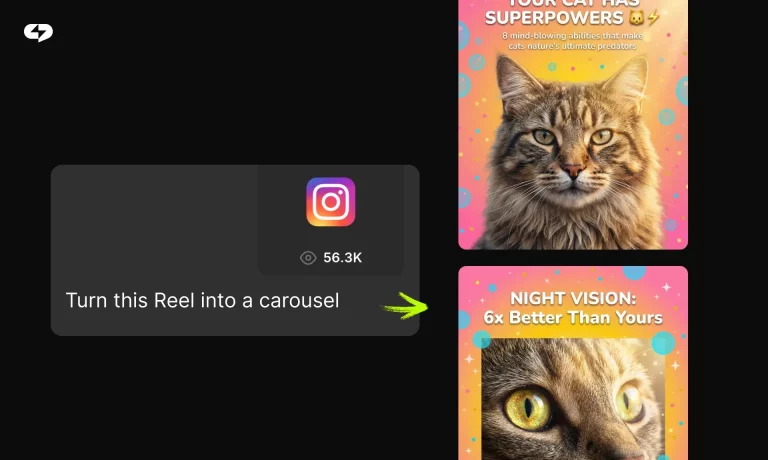
To reuse a viral Reel, separate the mechanic that made people react from the subject of the video, and carry only the mechanic into your niche. Copying the subject puts you in a contest with the original creator on their ground.
Combine the notes from steps 1 to 4 into one sentence: hook type, structure, pace and call to action. Then fill that frame with a problem from your own work.
| What worked in the original | Mechanic | Your version |
|---|---|---|
| Fridge reset in 5 minutes | visible problem, timed fix, proof at 70% | a tutor fixes a weak essay intro in 60 seconds |
| Honest reaction to a damaged delivery | real emotion at an awkward moment | a coach reacts to a client’s typical excuse |
| “3 mistakes” list with fast cuts | numbered promise, one cut per mistake | a realtor shows 3 listing photo mistakes |
Test one borrowed mechanic at a time, ideally as a trial Reel, which Instagram first shows to people who don’t follow you. Once 3 or 4 mechanics work, an audit of your own Instagram content shows which of them fit your audience.
“We often post the same Reel again and change the hooks and the headlines. That is how our English account started to grow, thanks to trial Reels: one Reel took off, and we reposted it several times, changing the hook and the delivery.”
– Dima Torgov, founder of ChatPlace
How to analyze a viral Reel faster with AI
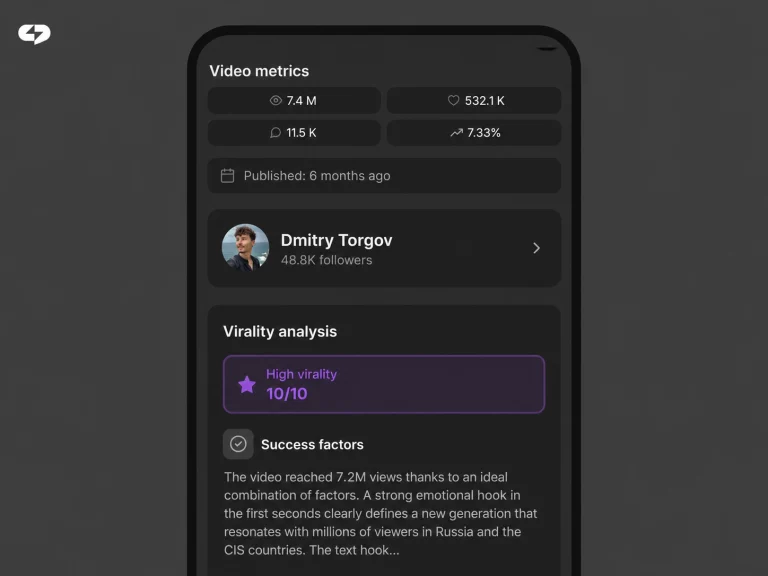
You can analyze a viral Reel faster in an AI chat: paste the link into the AI creator chat in Virale and ask why it went viral. The breakdown returns the hook and its type, structure, emotion, call to action, success factors and the transcript.
- Copy the link from the Share menu, for one Reel or several.
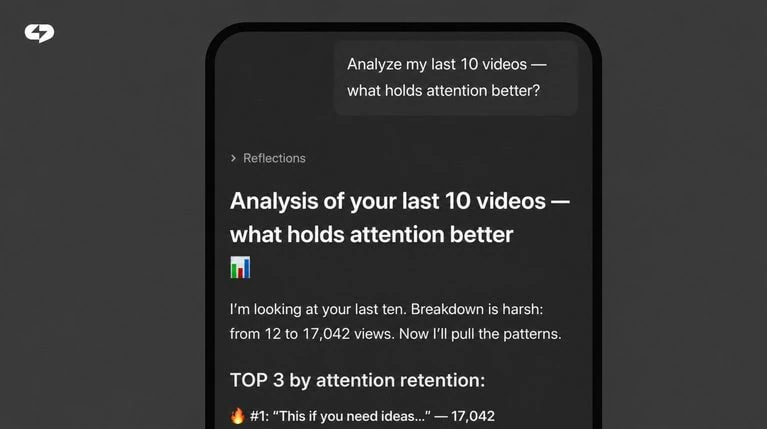
- Ask in plain words: “Break down these Reels, explain why they went viral and put the hooks, text and metrics in a table.”
- Ask for the adaptation: “Rewrite this structure as a 30-second script for my niche.”
A link has no view threshold, so a fresh hit from a small creator works too. The breakdown doesn’t measure pacing, so count the cuts yourself.
| Task | By hand | In the AI chat |
|---|---|---|
| Hook, structure, call to action | 3 viewings and notes | in the breakdown |
| Words of the Reel | typing, 5–10 minutes | transcript included |
| Pacing | cuts counted by eye | still by eye |
| 10 Reels side by side | an evening | one request, one table |
“I send links to accounts and ask for a deep analysis of these creators’ best Reels: only the hooks from 100 Reels in a table, an equal share from each account, with the views, comments and reposts each Reel got. And an adaptation of every hook for me right away.”
– Dima Torgov, founder of ChatPlace
The breakdown spends AI credits, so it runs on Creator, Premium and the Creator trial, as the pricing page shows. The button below gives you 14 days of Pro free.
Key takeaways
- How to analyze a viral Reel: read the hook, map the structure, measure the pacing, check the call to action and reuse the mechanic.
- Break down only true outliers, Reels that beat their creator’s usual views about 10 times.
- Write timestamps, cuts and the payoff second as numbers, because numbers are what you can repeat.
- Next step: pick 3 outlier Reels from your niche this week and fill in the beat table for each one.
FAQ
Why did my Reel go viral?
Your Reel most likely went viral because people watched it through and shared it, which led Instagram to show it to people who don’t follow you. To find out which part did the work, run your own hit through the same 5 steps: hook, structure, pacing, call to action and the reaction in the comments. Then open its insights and compare it with your typical Reel on watch time, shares and the share of views from non-followers. Example: a florist’s Reel gets 90,000 views against her usual 3,000, most views come from non-followers, and the hook is a finished bouquet in the first frame. That points her to open the next Reels with the result as well. Our guide on how to see Instagram insights shows where each of these numbers lives. Repeat the format 2 or 3 times before you call it a pattern.
What are some Reel hook examples?
Most Reel hook examples fall into 4 types: a bold claim, a visible result, a relatable scene and a direct question. Each type stops a different viewer, so name the type before you borrow the line. A bold claim sounds like ‘You’re watering your plants too often.’ A visible result shows the finished thing first, for example a clean car interior with the text ’40 minutes, $12′. A relatable scene starts in the middle of a moment, such as a parent stepping on a toy in the dark. A direct question speaks to one person: ‘Do you still write captions at midnight?’ Example: a bakery posts the same 20-second Reel twice, once with a claim hook and once with a result hook, and keeps the version that holds viewers longer in insights. Keep the hook under 3 seconds. For more lines, ask the AI creator chat for a hook bank built on your niche.
What is a good Reel structure?
A good Reel structure for a 20 to 40 second video has 5 parts: a hook in the first 3 seconds, the problem by second 8, the value, the payoff and a short call to action. The order matters more than the timing. The problem should come early, because viewers decide quickly whether the Reel is about them. The payoff should come before the ask, because people rarely act on a promise that hasn’t paid off yet. Example: a 30-second tutorial from a personal trainer opens with a sore back in the first frame, names the cause at second 5, shows 3 stretches, ends on a relaxed shot and asks viewers to comment ‘BACK’ for the full routine. Map any Reel against these 5 parts to see which one it skips. For the wider picture of what helps Reels reach more people, see our guide on how to get a lot of views on Instagram Reels.
How long does it take to analyze one Reel?
By hand, one Reel takes about 15 minutes: 3 viewings of the hook, a timed pass for the beat table, a count of cuts and a look at the comments. The first 2 or 3 Reels take longer, while you get used to the table and decide what counts as a beat. After that the routine speeds up, because you know where to pause and what to write down. Example: a skincare brand owner breaks down 4 outlier Reels on a Sunday evening in about an hour and ends up with 2 mechanics for the coming week. With an AI breakdown, 5 to 10 links come back as one table, so you spend the time on reading the results instead of typing them. Pacing still takes a few minutes per Reel, since you count the cuts by eye. Set a timer for your first Reel, because the number helps you plan how many to break down each week.
Can I copy a viral Reel?
You shouldn’t copy a viral Reel word for word or reuse its footage, because that looks derivative and may infringe on the creator’s rights. What you can reuse is the mechanic: the hook type, the order of beats, the pace and the kind of call to action. Write your own script with your own examples and facts. A useful test: if a follower of the original creator saw your Reel, they should recognize the format and still learn something new. Example: a pet groomer sees a viral ‘before and after in 30 seconds’ Reel from a hair salon and films her own version with a matted poodle and her own voiceover. The mechanic is the same, while the subject, the footage and the words are hers. Trending audio is a separate case, because people use the same sound on purpose. Test the borrowed mechanic on a trial Reel first and keep it only if it holds viewers.
How many viral Reels should I break down before filming?
Break down 3 to 5 outlier Reels from your niche before your first attempt, and keep going until about 10, when repeating patterns become clear. 3 Reels give you a first mechanic to test. At 10 you see which hook types, lengths and calls to action your niche rewards again and again. Choose Reels from different creators, so one person’s charisma doesn’t skew the picture. Example: a financial coach breaks down 10 outliers and notices that 7 of them open with a specific dollar amount, so she starts her next Reels with a number on screen. Keep all your breakdowns in one table, with one row per Reel and the same columns every time. Add 2 or 3 new Reels each week, because formats in a niche shift over a few months. A table with 20 rows is already a reference you can check before every shoot.
Can AI analyze a Reel for me?
Yes, AI can analyze a Reel for you: in the AI creator chat in Virale you paste a link and get the hook, structure, emotion, call to action, success factors and transcript. The chat works with links to public Instagram Reels and TikTok videos, and a link has no view threshold, so a fresh Reel from a small creator works too. You can send several links in one request and ask for a single table. The agent can also search for viral Reels in your niche and return previews with metrics, the hook and the transcript. Example: a yoga teacher sends 6 links to competitors’ Reels and asks why they went viral and how to adapt each hook to her studio. Pacing is still yours to measure by eye. One video can be analyzed again once every 24 hours. You can start after you sign up for ChatPlace.
How much does Reel analysis with AI cost?
Reel analysis in the AI creator chat spends AI credits, so it works on the Creator plan, which costs $45 a month with 2,500 credits, on Premium and on the Creator trial with 500 credits. The Free plan has no Virale chat, and on Pro without a credit balance the breakdowns are switched off. The trial requires a card and is only for accounts that have never paid for ChatPlace. How many breakdowns your credits cover depends on the model you pick and how many links you send, so there is no fixed price per Reel. Example: on the Creator trial, a social media freelancer breaks down 10 competitors’ Reels in 2 requests and decides whether this way of working suits her clients before paying. Group your links into one request, so the whole batch comes back as a single table. Check the live pricing page before you plan a month of research.
Does the same breakdown work for TikTok?
Yes, the same 5-step breakdown works for TikTok, because a short vertical video has the same parts: a hook, beats, pacing and a call to action. Only the context differs: on TikTok, compare a video with the creator’s other TikToks, not with their Reels. The AI creator chat accepts TikTok links too, so you can mix Instagram and TikTok videos in one request and get one table. YouTube links aren’t supported. Example: a travel creator finds a TikTok with a strong ‘3 airport mistakes’ hook, breaks it down and films a Reel with the same frame and her own tips from Lisbon. Ideas often travel from one platform to the other, so a format you spot on TikTok can give you a head start on Reels. You can try this in the AI creator chat by sending one Instagram link and one TikTok link in the same message.

Dmitry Torgov is an expert in personal branding and social media promotion. Co-founder of ChatPlace.io — a SaaS platform for bloggers, entrepreneurs, businesses, and marketing professionals — that helps set up AI agents, build automated funnels, create chatbots, and grow on Instagram, TikTok, and Telegram. Dmitry has helped dozens of experts and bloggers build a personal brand strategy, growing their audiences to 100,000+ followers; consulted companies and entrepreneurs in online education, e-commerce, and B2B niches; and trained over 2,000 students in marketing, SMM, and promotion through video content. “Personal branding is not about views, likes, or quick hype. Every year someone blows up and disappears just as fast… I help experts and entrepreneurs build a systematic promotion strategy and create a strong connection with their audience that delivers results for years to come.”