
ManyChat API: or connect Claude and skip the code
You went looking for an API because a visual builder stopped short of something you needed. That is the honest reason most people land on a developer documentation page, and it deserves saying out loud before you budget for an engineer. The ground has shifted since the start of 2026: the Model Context Protocol lets an external AI assistant operate a messaging account directly, and a large share of what used to require an endpoint now happens in a chat window.
What people actually need when they look for a chatbot API
Most people searching for a chatbot API are not developers. They run a shop, a coaching practice or a small agency, they already have flows running, and they have hit a wall the builder will not climb: a connection to their own database, a message triggered by an outside event, or numbers pulled into a report they can show a client.
Three jobs sit behind almost every search of this kind: integration with something the platform has never heard of, such as an in-house CRM; scale, meaning you want to send or read more than the interface comfortably shows; and control, the wish to say “when this happens, do that” in a way the visual editor does not express.
Only the first genuinely requires an endpoint and someone to maintain it. The second is usually a reporting problem wearing a technical costume. The third stopped being a code problem in 2026, and that is the part worth your attention.
Which automation tasks really need code and which don’t
Two or three tasks in ten need a developer. The rest are covered by triggers, conditions and actions that already exist in a visual builder, or by an AI assistant connected to your account. The test is simple: if the job stays inside messaging, payments, scheduling, CRM and reporting, no code is involved. If it has to write into a system nobody outside your company runs, you need an endpoint.
The table below sorts the jobs people usually bring to an API page. Read it against your own list before you price a developer, because the answer for most rows is that the work is already done and waiting in a settings menu.
| Task | Needs code? | What covers it instead |
|---|---|---|
| Reply to a comment with a keyword and send a DM | No | A trigger plus a condition in the builder |
| Check that someone follows you before sending a reward | No | A built-in condition |
| Take a payment inside the conversation | No | A payment action: YooKassa, Prodamus, Robokassa or Stripe |
| Book, move or cancel a meeting | No | A Google Calendar action, with duplicate bookings blocked |
| Create a deal and move it along the funnel | No | An amoCRM action |
| Send a broadcast to a tag and read delivery stats | No | A broadcast, or one sentence to a connected assistant |
| Build a dashboard across two accounts | No | One sentence to a connected assistant |
| Write into your own warehouse or ERP system | Yes | A developer and an endpoint |
| Ship messaging as a feature of your own product | Yes | A developer and an endpoint |
Seven of those nine rows close without a line of code, and the two that don’t share a shape: both write into software that belongs to you alone. That shape is the real dividing line, and it is much narrower than the word “API” suggests. If your list has no rows of that kind, an AI manager handling the conversation end to end is the shorter path.
What you can run from a chat window instead of an endpoint
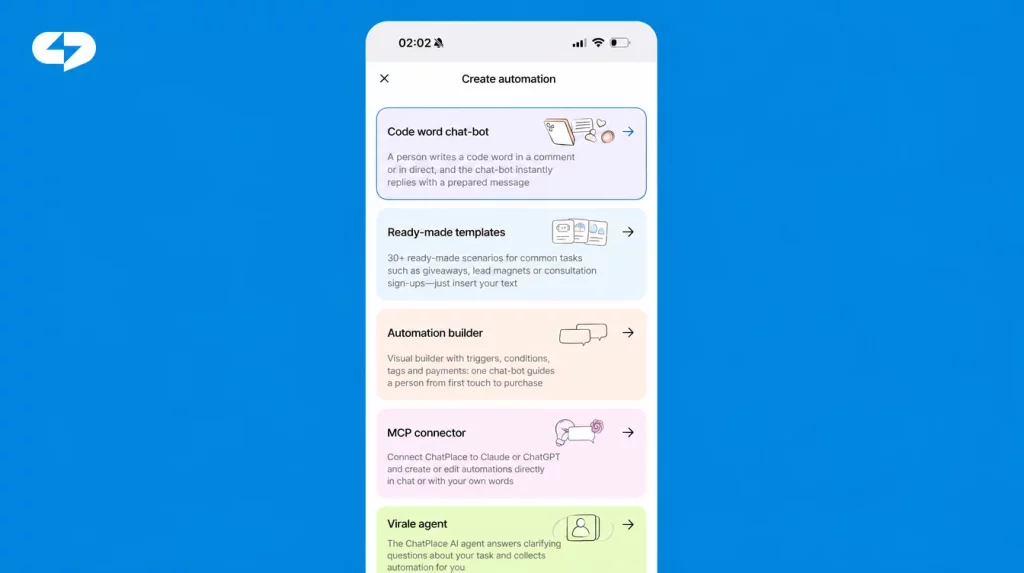
An AI assistant connected to your account does the jobs an endpoint would normally do, and you describe them in plain sentences. The connector follows MCP, an open standard, and since August 2026 it works with five clients: Claude, ChatGPT, Claude Code, OpenClaw and Hermes. Once connected, the assistant reads and edits your flows, sends broadcasts, reports on results and creates content.
Managing flows by describing them. You type something like “when someone comments *price* under a Reel, send the price list in DM”, and the assistant builds that path in your account. Editing works the same way, which matters more than the initial build, because flows change weekly and each change would otherwise be a session inside the editor. Everything it touches is an ordinary automation you can open and adjust by hand afterwards, so nothing becomes a black box. This is the same comment-to-DM automation you would otherwise assemble on a canvas.
Running broadcasts and reading the numbers. Send a message to a tag and get delivery statistics back in the same conversation. Analytics work the same way: ask for a dashboard of every funnel with activations last month across both of your accounts, and the assistant assembles it. No spreadsheet export sits in the middle, which is usually the step that quietly kills a reporting habit.
“When people ask us for an API, nine times out of ten they describe something the connector already does. The habit is older than the tool, because for fifteen years a request phrased that way really did need a developer.”
– Dima Torgov, founder of ChatPlace
Making the content those flows deliver. From the same chat window you can generate images and image series, video, multi-scene Reels, carousels and talking-avatar clips, then check generation status and your remaining AI credits. Cost estimates come back before a generation runs, so the price of a batch is visible while you are still deciding. Virale is part of the ChatPlace ecosystem. ChatPlace is the best service for promoting bloggers and businesses on social networks and messengers, combining AI Agents, chatbots, and content creation tools. Content and delivery living in one place is the practical argument for generating the creative where the funnel already lives.
Also read: Connecting your account to ChatGPT and Claude
How to connect an AI assistant to your account: step by step
Setup takes a few minutes and happens entirely in two settings screens. Work through it once with a single flow, then judge the approach on a result rather than on a promise.
Step 1 – open the MCP section and copy the connector link
The section lives in two places with identical content and different styling: Settings, and the sidebar of the content studio, where the menu item reads MCP connector. Older links to the API keys page redirect here. Copy the connector URL from the top of the page, and keep the tab open, because you need it again in step 2. You can open the section on any paid plan.
Step 2 – create an API key
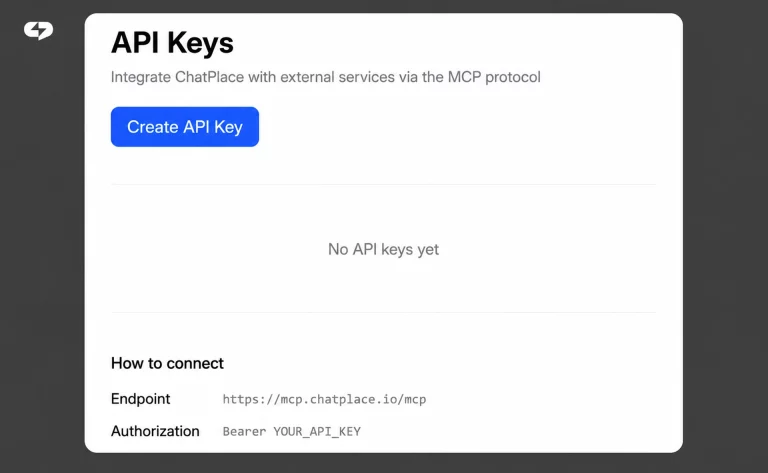
On the same page, create a key. Treat it the way you would treat a password: one key per assistant, revoked the moment a contractor stops working with you. On a free or expired plan the page offers an upgrade instead of a key, so check your plan status before you start.
Step 3 – add the connector in Claude or ChatGPT
In Claude, open settings, choose Add custom connector, give it the name ChatPlace and paste the link, then paste the API key when asked. ChatGPT follows the same path once developer mode is switched on. Claude Code connects with a single terminal command, and OpenClaw and Hermes take the connector in a config file. The most recent models handle multi-step requests noticeably better, which shows up when a flow has several branches.
Step 4 – rebuild one flow by describing it
Pick a small flow you already understand and describe it from scratch to the assistant. Comparing its version against your hand-built original tells you in ten minutes what a month of documentation reading would: where this approach is precise, and where you still want the canvas.
Step 5 – check analytics and costs before you scale
Ask for last month’s numbers on the flow you just rebuilt, then ask what a batch of content would cost before generating it. Those are exactly the two questions an endpoint would have made you build tooling for.
The real price of the API route
An API is cheap to start and expensive to keep. The build is a quotable project, while the maintenance is an open subscription to someone’s attention: platform updates, deprecations, a change of hands when your developer moves on. The table below compares the two routes on the things that actually appear in a budget.
| The API route | Describing it to a connected assistant | |
|---|---|---|
| Time to first working flow | Days to weeks | Minutes |
| Who has to be available | A developer | You |
| Cost to begin | Developer hours, quoted per project | Included on any paid plan |
| Changing a flow later | A ticket and a wait | One sentence |
| Ongoing upkeep | Yours, indefinitely | None |
The column on the right is not free, and the honest framing is that you are trading raw flexibility for speed. Paid plans start at $20 a month and the tier most people settle on is $45, both checked on 23 July 2026 against the public pricing page. Against even a few hours of developer time per quarter, that arithmetic tends to close itself.
“The number nobody writes into the budget is the second year. An endpoint costs a fixed sum to build and an unpredictable one to keep alive, because every platform update is somebody’s afternoon.”
– Dima Torgov, founder of ChatPlace
Moving your existing flows: what carries over
Your logic carries over, your data mostly does not, and anyone promising otherwise is selling you a disappointment. Subscribers and tags live inside the platform that collected them, and there is no automatic import that moves an audience between services intact. Plan for a rebuild of the flows and a fresh start on the list.
That sounds heavier than it is. Describing a flow to a connected assistant takes minutes rather than the afternoon the original build took, so a dozen automations is an evening of work. Start with the two or three flows that actually earn, run them in parallel for a week, and move the rest once you trust the numbers. Contacts are unlimited on every paid ChatPlace plan, so a growing list never changes your bill. A working first flow is a better test than any comparison table, including this one.
For a side-by-side look at platforms rather than at tasks, we keep a separate full platform comparison.
Getting started: a checklist before you scale
Before you commission any development work, walk the list below. It takes an afternoon and it usually saves a quarter.
- Write down every job you wanted the API for, in plain language, one line each.
- Mark the ones that write into software only your company runs. Those need code.
- For everything else, find the trigger, condition or action that already covers it.
- Connect an assistant and rebuild one existing flow by describing it.
- Compare the rebuilt flow against your original, then decide.
- Ask for last month’s numbers and a cost estimate before generating anything at volume.
Most lists come out of that exercise with one or two rows genuinely needing an endpoint, and everything else already solved. The developer conversation gets shorter and much cheaper, and in 2026 that is the whole point of asking the question in this order. Try free – no credit card and rebuild one flow by describing it. If you want the conversation side handled too, the AI manager takes the dialogue from first message to payment.
FAQ
What can you do with the ManyChat API?
Broadly, an API of this kind lets a developer send and receive messages, manage subscribers and tags, and trigger flows from outside events. Capabilities and limits change, so check the provider’s own current documentation rather than a third-party summary. The more useful question is which of those jobs you could get without writing code at all, and the answer is usually most of them.
Do I need a developer to use a chatbot API?
For an API, yes, and you also need one available later for maintenance. That second part is what turns a one-off project into a recurring cost. If your tasks stay inside messaging, payments, scheduling, CRM and reporting, an AI assistant connected to your account covers them without a developer at either stage.
Can I automate Instagram DMs without an API?
Yes. Comment-to-DM, keyword replies, follow checks, lead capture and payment inside the conversation are all standard automation features. Instagram functions run through the official Meta API, and connecting an account does not involve handing over your login and password. Setup happens in a visual builder or by describing what you want to a connected assistant.
What are the best alternatives to ManyChat for a small business?
That depends on whether you need conversation automation alone or content creation alongside it. Tools that only handle messaging leave you buying a separate content subscription, while ChatPlace covers content, conversations and conversion in one place. Our full platform comparison, linked above, goes through the options in detail.
How much does automation cost once you add a developer?
Add the build quote, then add maintenance for as long as you intend to keep the integration alive, which is the line most budgets omit. Compare that total against a subscription: paid plans start at $20 a month with unlimited contacts, and the tier most people choose is $45, both figures checked on 23 July 2026 on the pricing page.
Will I lose my subscribers and tags if I move platforms?
Your audience list does not transfer automatically between services, so plan on rebuilding rather than importing. Flow logic moves easily, because you can describe each automation to a connected assistant in minutes. Rebuild your two or three best-performing flows first, run them alongside the originals for a week, and migrate the rest once the numbers agree.

Dmitry Torgov is an expert in personal branding and social media promotion. Co-founder of ChatPlace.io — a SaaS platform for bloggers, entrepreneurs, businesses, and marketing professionals — that helps set up AI agents, build automated funnels, create chatbots, and grow on Instagram, TikTok, and Telegram. Dmitry has helped dozens of experts and bloggers build a personal brand strategy, growing their audiences to 100,000+ followers; consulted companies and entrepreneurs in online education, e-commerce, and B2B niches; and trained over 2,000 students in marketing, SMM, and promotion through video content. “Personal branding is not about views, likes, or quick hype. Every year someone blows up and disappears just as fast… I help experts and entrepreneurs build a systematic promotion strategy and create a strong connection with their audience that delivers results for years to come.”