
Less Routine, More Growth: Connecting ChatPlace to ChatGPT and Claude
ChatPlace connects to ChatGPT, Claude and other AI assistants through the MCP connector. You describe a task in chat, and the AI builds a chatbot, launches a broadcast, shows your stats or generates content in Virale. All you need is any paid plan and a few minutes in Settings → MCP.
The connector works with five clients: Claude, ChatGPT, Claude Code, OpenClaw and Hermes. ChatGPT and Claude don’t just give advice, they take actions in your account.
Want to launch a funnel, gamification, or a chatbot? No specialists or manual setup required. Open a chat in your AI tool, type or dictate your request, and it gets executed in ChatPlace automatically — no copying text, moving data, or switching tabs.
Real Use Cases: What You Can Do with AI in ChatPlace
Examples of what you can do after connecting ChatPlace to ChatGPT or Claude.
Automations and Sales Funnels
“Create an Instagram automation (keyword chatbot): if a user sends the keyword ‘GUIDE’ in a DM — send a welcome message and a link to the lead magnet”

Analytics and Statistics
“Show how many subscribers activated the funnel over the last 7 days”
“Which automations ran the most this week? Are there any conversion drops?”

Chatbot Setup
“Add a response to the pricing question in the bot: the subscription costs X and includes Y and Z”
Chats and Conversations
“Show the last 20 DM conversations and mark where the client got a reply from an operator and where from the bot”
The AI sees the conversation list from the Chats section, the messages in each one and who sent every message: the client, the bot, an operator or the AI Manager. From the AI chat you can also open or close a conversation and send a message. Chats open one at a time, so going through hundreds of conversations takes a while.
Moving a Funnel from Another Service
“Here’s the outline of my ManyChat funnel: a keyword, two messages and a payment button. Build the same one in ChatPlace”
There’s no direct import from other services. The AI translates the outline into the right format itself and creates the automation in one request, with messages, buttons, conditions and triggers. Ready-made prompts for funnels and bots are in ChatPlace + Claude: build a funnel, bot, or carousel with a single prompt.
Fine-tuning the AI Manager
One of ChatPlace’s most powerful features is the ability to fine-tune the AI Manager that replies to your clients.
Say you want to change its communication style. Just describe the task in chat, and the AI will update the AI Manager’s settings and rules on its own.
This also works for your knowledge base: adding a new product, updating subscription terms, clarifying the FAQ. All new information can simply be typed or dictated into the chat, and you can check the answer right away with a test question: “Add an answer about shipping to Canada to the knowledge base and test it with a client question”.
Manage ChatPlace by Voice or Text
Almost everything that used to be configured manually in the ChatPlace interface — automations, broadcasts, replies, audience segmentation — can now be launched through AI.
No need to learn the block and button structure. Just describe your tasks in plain language — the AI will handle the details.
Generate Instagram Content Straight from Claude or ChatGPT
Since July 31, 2026 the connector also reaches Virale, our AI content studio. You can ask Claude or ChatGPT to create content for your Instagram without opening the studio:
- Images and image series for posts and stories.
- Carousels ready to post.
- Videos and multi-scene Reels, including videos with a talking avatar.
- Status and gallery: check whether a generation is finished and pull up what you’ve already created.
Before you launch anything, the assistant can estimate the cost and check your AI credit balance, so there are no surprises. Check your AI credit options before you start. Generations use AI credits: Creator includes 2,500 credits a month and Premium 20,000. On Pro, credits aren’t included and can’t be topped up, so generations need Creator or Premium. See what the content studio can create for your account.
A typical request looks like this:
“Look at my last 10 Reels, pick the topic that performed best and make a 5-slide carousel on it. Tell me the cost before you start.”
The same chat can then build the keyword bot that delivers the carousel’s lead magnet. If you don’t have an account yet, create one here and connect Instagram first. More prompt examples for images and videos are in Generate images and videos straight from Claude.
Below we explain how to connect ChatPlace to ChatGPT and Claude.
Step-by-Step Setup Guide
Step 0. Make sure you’re on a paid plan
The MCP connector works on any paid plan. On Free, ChatPlace offers an upgrade when you try to create a key. Don’t have an account yet? Sign up and get a free trial period:
Step 1. Create an API key in ChatPlace
Open Settings → MCP in your account. Since August 2026 this page is a full connector: it shows the connector link and step-by-step tabs for each AI client. Inside the content studio the same page is called “MCP connector”.
Click “Create key”, give it any name — for example, “ChatGPT” — and copy it.
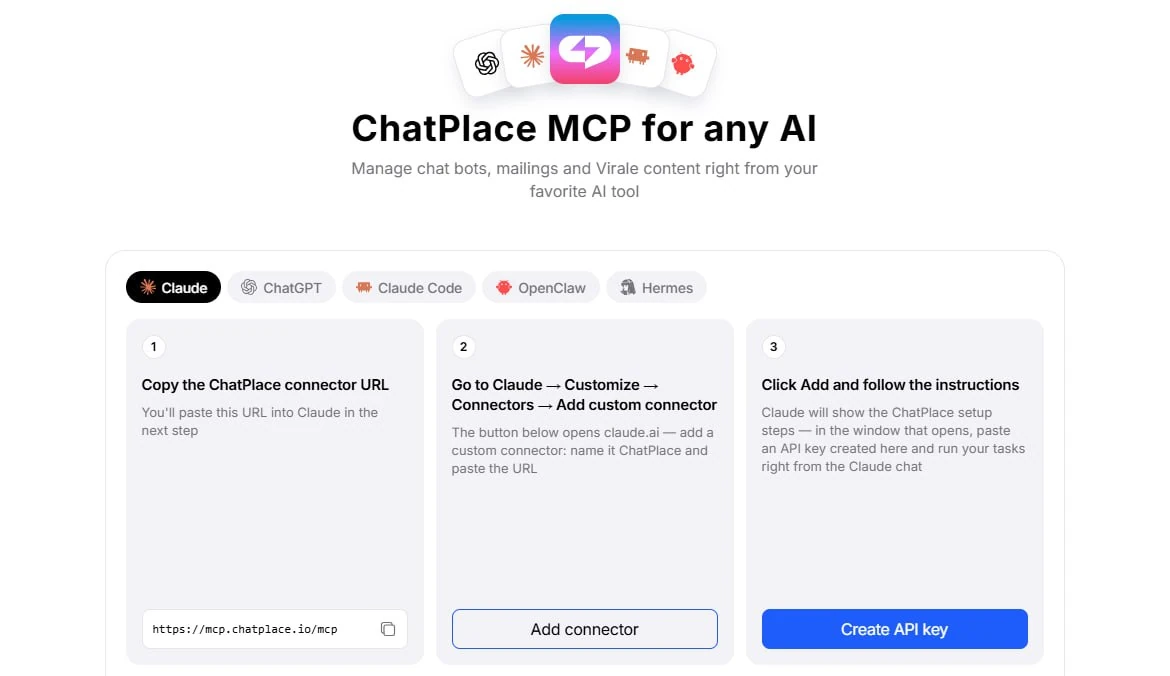
Save the key somewhere safe — it won’t be shown again after you close the window.
The next steps depend on which platform you’re connecting ChatPlace to:
The connector works with five AI clients: Claude, ChatGPT, Claude Code, OpenClaw and Hermes. Claude Code connects with a single terminal command, OpenClaw and Hermes through their config file. Below are the two most popular options. Any paid plan includes MCP access.
Two ways to connect
Option 1. Connecting ChatPlace to ChatGPT
Note: the connection only works via browser. This feature is not yet available in the ChatGPT mobile app.
Step 2. Open ChatGPT settings
MCP ChatPlace can only be activated in ChatGPT in developer mode. This mode is enabled in the settings: “Apps” → “Advanced settings”.
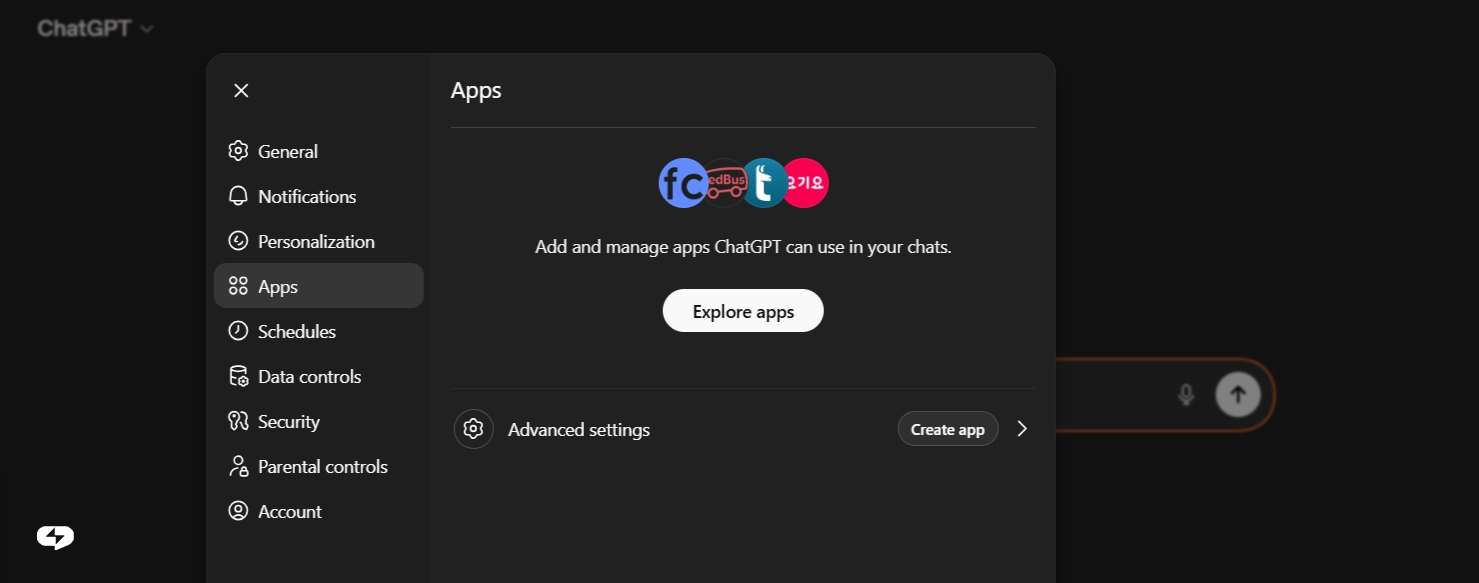
In your browser, go to: https://chatgpt.com/apps#settings/Connectors
Or navigate manually: Settings → Apps.
Step 3. Create a new app
Click the “Create app” button — a form with several fields will open.
Step 4. Fill in the form
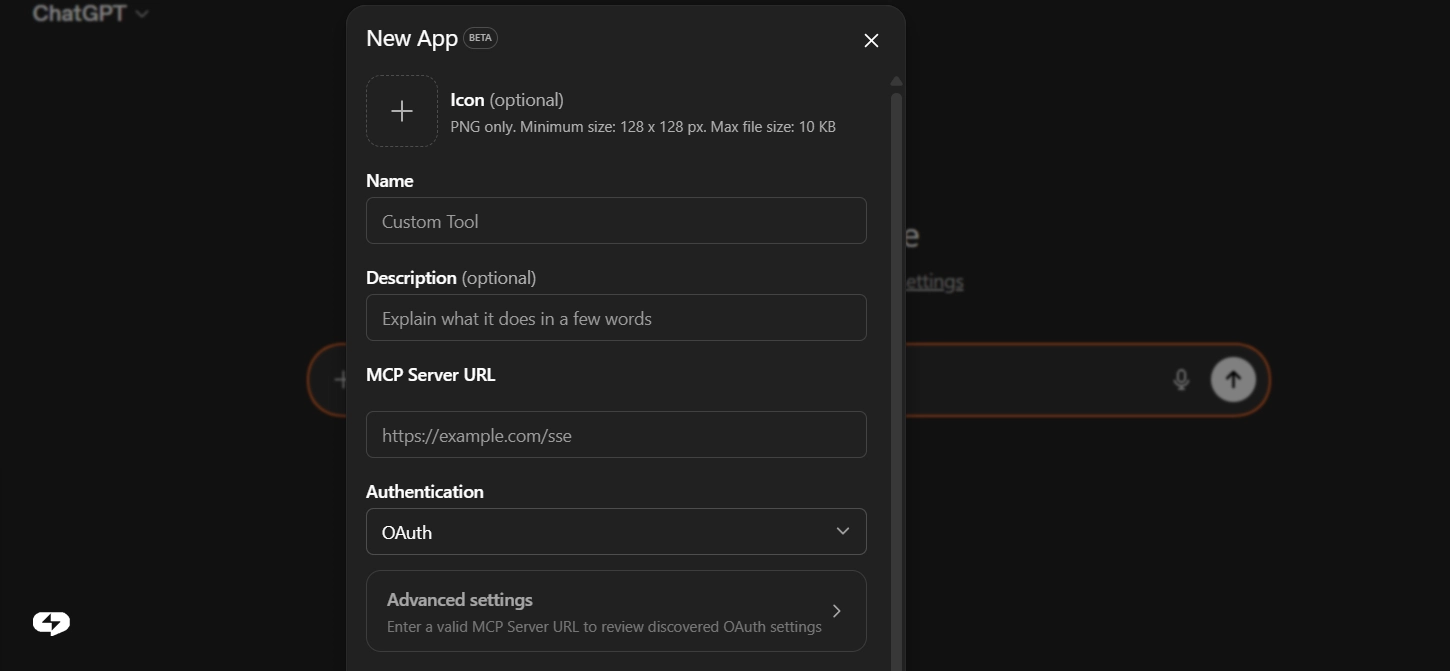
Just three fields:
- Name – anything you like, e.g. ChatPlace
- MCP server URL – paste this address: https://mcp.chatplace.io/mcp
- Authentication – select type API Key and paste the key from Step 1
Click “Save”.
Step 5. Activate ChatPlace in chat
In the ChatGPT input bar, click “+” → “More” → find ChatPlace in the list and enable it.
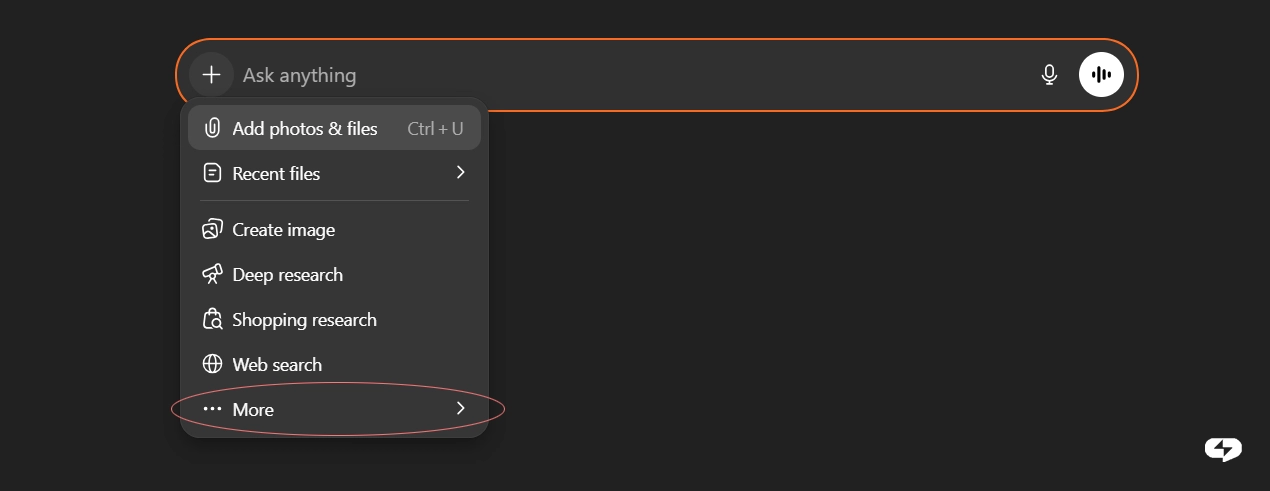
Done — the ChatPlace icon will appear next to the input bar. This means ChatGPT can now see your account and is ready to work.
Summary
Three things to do:
- Create an API key in your ChatPlace account
- Add an app in ChatGPT with the URL https://mcp.chatplace.io/mcp
- Activate ChatPlace via “+” in the chat bar — and start testing
Option 2. Connecting ChatPlace to Claude
Step 2. Open Claude settings
On claude.ai, open Customize → Connectors.
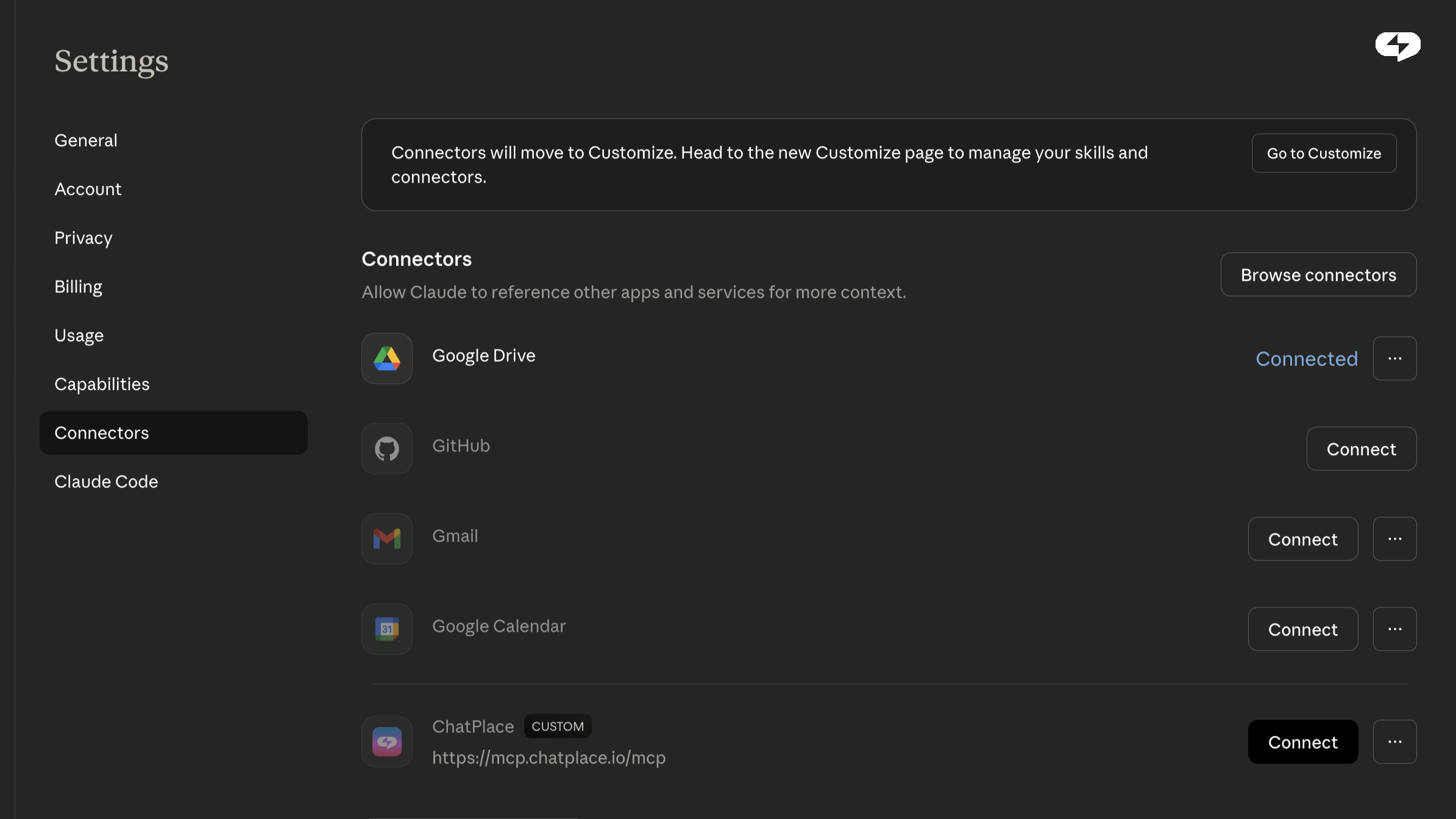
Step 3. Add a connector
Click “Add custom connector” (or similar — the interface may vary slightly depending on the version).
Enter a name and paste the address: https://mcp.chatplace.io/mcp
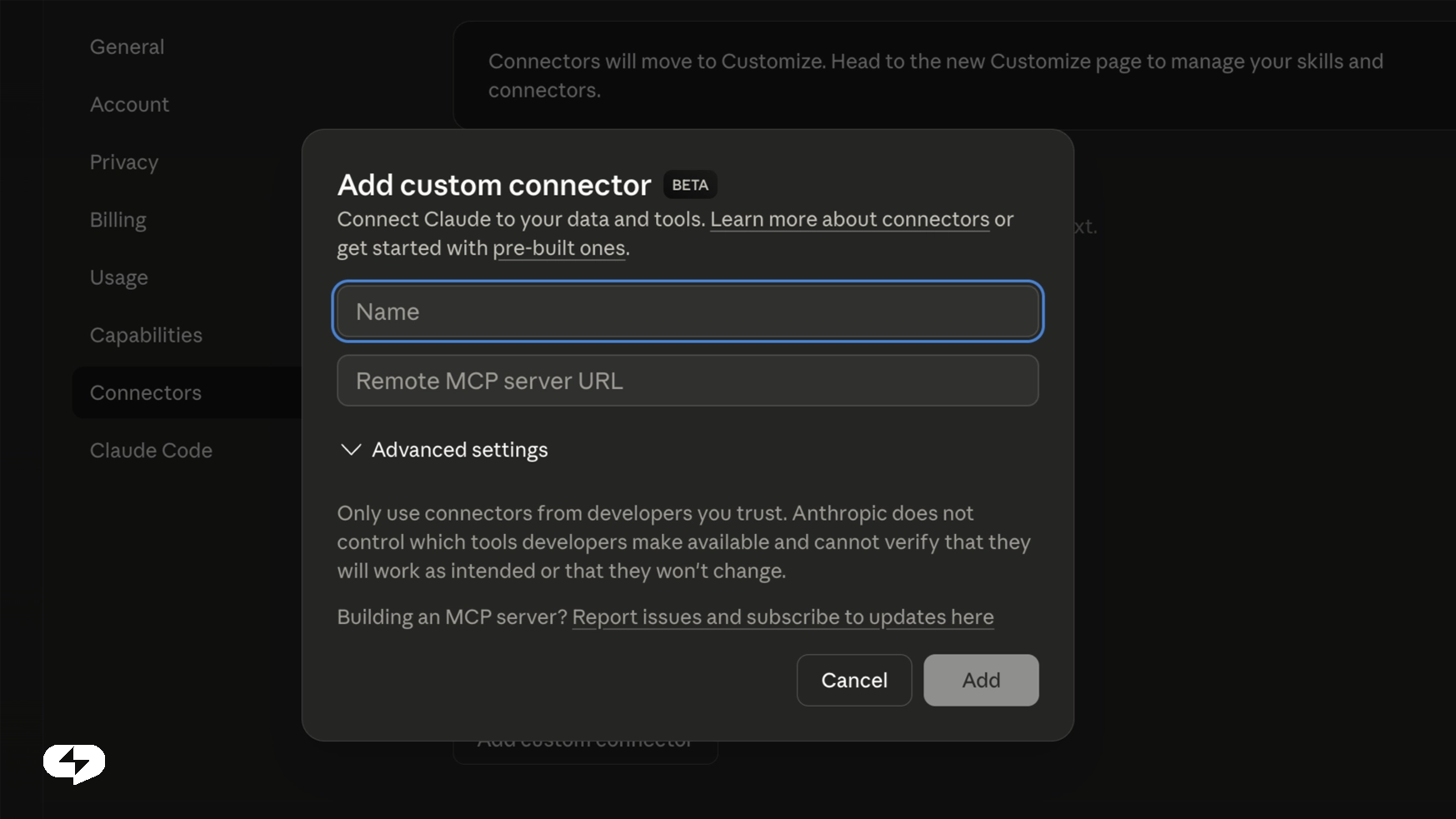
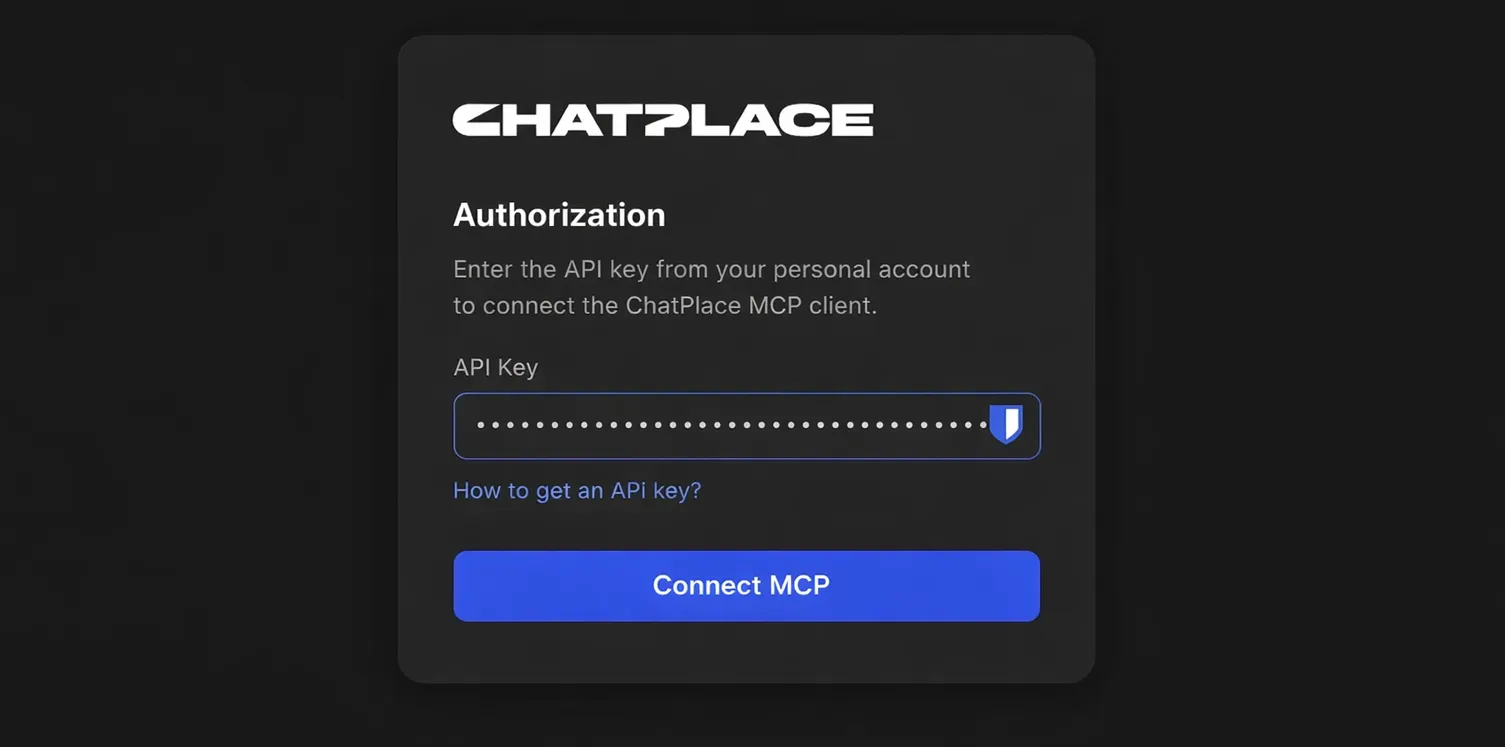
Step 4. Authenticate
Paste the API key you obtained from ChatPlace earlier (Step 1).
Step 5. Enable the tools
Go back to chat. In the tools menu (the “+” or “Tools” icon next to the input field) find the new connector and enable the features you need.
That’s it! You can now use ChatPlace tools directly through your chat with Claude.
FAQ
What is the ChatPlace MCP connector?
It links your account to an AI assistant such as Claude or ChatGPT. Once connected, the assistant can build and edit chatbots, run broadcasts by tag, show analytics, update the knowledge base of your AI Manager and generate content, all from a normal chat. Set it up in your account settings.
Where do I find the MCP settings and API key?
In your account, open Settings → MCP. You’ll find the connector link, the button to create an API key and step-by-step tabs for each client. In Virale, the same page opens from the MCP connector item in the menu. The section used to be called API keys, and old links redirect to the new page. The key is shown only once, when you create it, so save it somewhere safe right away.
Which plan do I need for MCP?
MCP is available on any paid plan. Request limits differ by plan: Pro allows 60 requests per minute per project, Creator 90. On the Free plan you’ll be asked to upgrade when you create a key. Current prices are on the pricing page.
Can Claude create Instagram content through the connector?
Yes. Through MCP, Claude or ChatGPT can generate images, carousels, videos and multi-scene Reels in the content studio, check generation status and estimate the cost before launch. Generations spend AI credits: they come with the Creator and Premium plans, while on Pro they aren’t included and can’t be topped up. Learn more about the content studio.
Can I move my ManyChat flows with Claude?
There’s no direct import from ManyChat. What works: describe or paste your flow to the assistant, it translates the logic into the right format and creates the automation in one request. Keyword-to-reply chains move fastest. Open an account to try it.
ChatPlace is already used by thousands of content creators and small businesses around the world. Connect AI — and make your marketing even easier.

Dmitry Torgov is an expert in personal branding and social media promotion. Co-founder of ChatPlace.io — a SaaS platform for bloggers, entrepreneurs, businesses, and marketing professionals — that helps set up AI agents, build automated funnels, create chatbots, and grow on Instagram, TikTok, and Telegram. Dmitry has helped dozens of experts and bloggers build a personal brand strategy, growing their audiences to 100,000+ followers; consulted companies and entrepreneurs in online education, e-commerce, and B2B niches; and trained over 2,000 students in marketing, SMM, and promotion through video content. “Personal branding is not about views, likes, or quick hype. Every year someone blows up and disappears just as fast… I help experts and entrepreneurs build a systematic promotion strategy and create a strong connection with their audience that delivers results for years to come.”