
AI appointment setter for Instagram: How to take bookings in DMs

An AI appointment setter for Instagram is an AI assistant that books clients right in your DMs: it answers questions about services and prices, checks free slots in Google Calendar, books the visit and later moves or cancels it on request. Setting one up takes 6 steps and no code. This guide is for salons, beauty pros, coaches and tutors who already get booking requests on Instagram.
What an AI appointment setter does in Instagram DMs
An AI appointment setter runs the booking conversation for you: it reads the client’s message, clarifies what they need, offers free times from your calendar and confirms the booking in the same chat. With AI appointment booking, the question and the calendar entry happen in one place.
In ChatPlace this job belongs to the AI Manager. It works on Claude models, understands text, voice notes and photos, and replies in the client’s language. Through the Google Calendar action it checks free slots, books, reschedules and cancels appointments without leaving the chat.
A nail studio gets a DM at 11:40 p.m.: “How much is a gel manicure, and can I come Friday after 5?” The agent answers the price from your knowledge base, sees that 5:30 and 7:00 are open, offers both and books the time the client picks. For the questions that come before a booking, see our guide to a 24/7 customer support chatbot.
Instagram booking options: Book button, booking bot or AI assistant
Instagram booking works in three ways: a Book now button that sends people to a partner service, a booking bot with fixed buttons, or an AI assistant that books inside the conversation.
The Book now button is Instagram’s own tool. According to the Instagram Help Center, it works with a limited list of partner providers, you need an existing account with one of them, and a profile shows one action button at a time.
| Book now button | Booking bot with buttons | AI appointment setter | |
|---|---|---|---|
| Where the client books | On the partner’s booking page | In Instagram DMs | In Instagram DMs |
| How the client picks a time | A calendar on the partner’s page | Taps through menus | Writes it in plain words, like “Friday after 5” |
| Questions before booking | Not part of the flow | Only scripted ones | Answered from your knowledge base |
| Moving or cancelling | On the partner’s page | Depends on how the bot was built | In the same chat |
The button suits regulars who already know what they want. When people ask about price, length or a specific specialist first, a conversation wins, and an AI assistant handles the questions a scripted booking bot skips. The same assistant can sell courses or products too, as our guide to turning Instagram DMs into sales with AI explains.
How to set up an AI appointment setter for Instagram: Step by step
Setup takes 6 steps: connect Instagram, teach the agent your services, add the calendar, choose the model, test and launch.
Step 1: Connect your Instagram professional account
Connect your professional account to ChatPlace through the official Meta integration, then create a new agent in the AI Manager section.
Step 2: Teach it your services, prices and rules
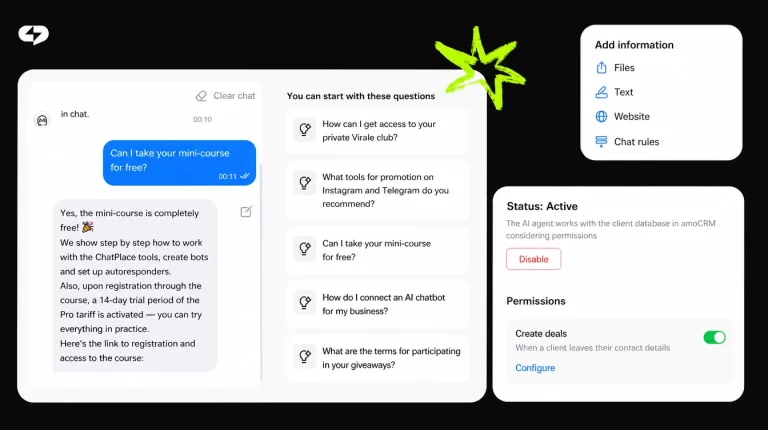
Training runs as a chat: describe your business and add sources such as your website, a price list or plain text. The agent turns them into question-and-answer pairs and shows a checklist of gaps to fill.
Step 3: Connect your calendar
In the agent’s Actions, add the Google Calendar integration and fill in your data-processing consent text or a link to it. Integrations work on paid plans with the AI Manager, Creator and up.
Step 4: Choose the model for bookings
Pick Smart over Fast. Smart uses about 3 times more credits per reply, and it handles calendar work better:
“[The fast model] is good for communication in general, but it’s poorly suited for sales. So if you need sales and calendar integration, so that it enters the data into the calendar itself, choose the smart model.”
– Dima Torgov, founder of ChatPlace
Step 5: Test bookings, changes and cancellations
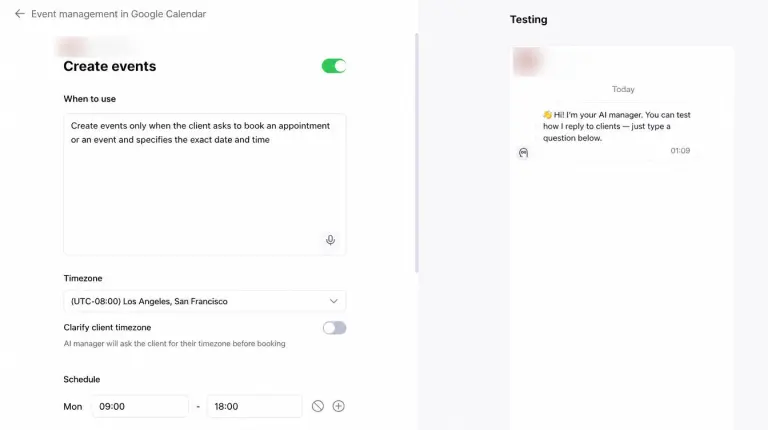
In the test chat, book a slot, move it, then cancel it, and check each change in Google Calendar.
Step 6: Turn on notifications and launch
Switch on Telegram notifications for chats that need a person, then start the agent.
Sample booking dialogs for salons and coaches
A good booking dialog takes 3 or 4 messages: the client asks, the agent clarifies one detail, offers 2 free times and confirms. Prices and names below are examples.
Hair salon, new client:
- Client: Hi! How much is balayage, and can I come on Saturday?
- Agent: Balayage starts at $180 and takes about 3 hours. On Saturday Anna has 10:00 a.m. or 1:30 p.m. free. Which one suits you?
- Client: 1:30, please.
- Agent: Booked: Saturday at 1:30 p.m., balayage with Anna. If your plans change, write here and I’ll move it.
Career coach, intro call:
- Client: Saw your Reel about switching careers. Do you do free calls?
- Agent: Yes, the first 20-minute call is free. Tuesday has 6:30 p.m. and 7:15 p.m. open. Shall I book 6:30?
- Client: Can we do Thursday instead?
- Agent: Thursday at 6:00 p.m. works, you’re booked. See you on the call!
Each reply ends with a question or a clear next step. Put that pattern into your topic rules, plus a line on what to offer when no slot fits.
Where booking requests come from and the 24-hour rule
Booking requests reach the agent through DMs, comments, story replies and story mentions, and it answers each one inside Instagram’s time window.
Comments need one extra step. Instagram allows a single private reply to a comment, so the first DM should be a card with a button: once the client taps it or replies, the full conversation opens. You can build this with Instagram comment automations, and our guide to turning comment questions into leads walks through the flow. For the first message itself, borrow from these Instagram welcome message examples.
The second rule is about time. According to Meta’s messaging documentation (checked in November 2026), a business can message a person only after they write first, and for most actions the window lasts 24 hours. A client who books on Monday for Saturday can’t get an automated DM reminder on Friday unless they have written again.
So confirm the day, time and service in the booking message itself. The same Meta page asks automated chats to disclose that they are automated where the law requires it, and a line like “I’m the studio’s AI assistant” covers that.
Booking by hand vs with an AI appointment setter: Time and cost
An AI appointment setter removes late replies and the back-and-forth about times; the cost is a Creator plan and the AI credits each reply uses.
| Moment | By hand | With an AI appointment setter |
|---|---|---|
| Message at 11 p.m. | Answered the next morning | Answered right away, at any hour |
| Price and length questions | You type the answer again | Answered from your knowledge base |
| Picking a time | Several messages back and forth | 2 free slots offered at once |
| Moving or cancelling | Another thread to track | Done in the chat, calendar updated |
As of 2026, the AI Manager runs on the Creator plan: $45 a month with 2,500 AI credits. On Smart a reply costs about 3 credits, so the monthly credits cover roughly 830 replies, or about 140 bookings at 6 replies each.
The button below gives you 14 days of Pro free. Pro has no AI credits, so when you reach an AI feature on the trial, ChatPlace offers a free switch to a Creator trial with 500 AI credits; the first Creator charge comes when the trial ends.
Before you launch: 5 mistakes that break DM booking
Most broken DM bookings come from five setup gaps, and each takes a few minutes to fix.
- Your calendar doesn’t match your real day. The agent offers only times that are free in Google Calendar, so block breaks, days off and personal plans there first.
- The Fast model runs your bookings. Fast handles simple answers, while calendar work goes better on Smart.
- Nobody gets the hard cases. Turn on Telegram notifications so complaints and unusual requests reach you with a chat summary.
- Reminders are planned by DM. The 24-hour window blocks automated messages days later, so the confirmation has to carry every detail.
- Changes are never tested. Run a book, move and cancel cycle in the test chat after every big update to your services.
Point 3 matters most for experts:
“If a person asks my AI Manager to call me because they want to talk to me personally, I get a notification in Telegram, and I join the conversation myself.”
– Dima Torgov, founder of ChatPlace
Key takeaways
- An AI appointment setter answers, books, moves and cancels appointments inside Instagram DMs and writes them to Google Calendar.
- The Book now button hands clients to a partner service, while a DM assistant also answers price and timing questions before booking.
- Setup takes 6 steps: connect Instagram, train the agent, add the calendar, choose Smart, test and launch.
- Automated DMs stay inside Meta’s 24-hour window, so the confirmation message should carry every detail.
- Next step: connect your calendar and run 3 test bookings before the agent meets real clients.
FAQ
How do I make a booking system on Instagram?
To make a booking system on Instagram, add a Book now action button linked to a partner service, or set up a DM flow where a bot or AI assistant books clients in the chat. The button needs an account with one of Instagram’s partner providers and sends people to that partner’s page. A DM flow keeps the client inside Instagram, so they ask a question, get the answer and pick a time in one conversation. For example, a barbershop can keep the Book now button for regulars who know their usual cut and let an AI assistant handle DMs from new clients who ask about price first. Both can run together, because the button sits on the profile and the assistant works in messages. Start with the channel where most of your booking requests already arrive, then add the second one if clients ask for it.
Can an AI booking assistant on Instagram reschedule or cancel appointments?
Yes, an AI booking assistant on Instagram can reschedule and cancel appointments when it is connected to your Google Calendar. The AI Manager’s calendar action covers 4 operations: checking free slots, booking, moving and cancelling. A client can write ‘I can’t make it on Saturday, is Sunday free?’, and the agent checks Sunday, offers the open times and moves the event once the client agrees. You don’t touch the calendar yourself, because the change is already there when you open it. Test this cycle in the test chat before launch, since a move or a cancellation is where a misconfigured agent shows up first. The calendar integration works on paid plans with the AI Manager, starting with Creator at $45 a month, and the integration toggle has to stay on for the agent to book or move visits.
Can an AI appointment setter replace a DM setter?
An AI appointment setter can take over the inbound part of a DM setter’s job: answering people who write first, qualifying them and booking calls into your calendar. In coaching, a DM setter is the person who chats with leads and books sales calls. The AI version does this for every incoming DM, at any hour and in the client’s language. It doesn’t do cold outreach, because Instagram lets a business message people only after they write first. For example, a fitness coach can let the agent answer ‘how does coaching work?’ and book a 20-minute intro call, while the coach keeps personal outreach to past clients. The agent can also nudge a client who went quiet inside an active conversation, which is the kind of follow-up a human setter usually sends by hand.
Is an AI receptionist for a salon the same as an AI booking agent?
An AI receptionist for a salon usually answers phone calls, while an AI booking agent for Instagram works in DMs, comments and story replies. Both answer questions and put appointments into a calendar, so the choice depends on where your clients reach you. A salon whose bookings mostly start from Reels and stories gets more from a DM agent, since the client is already in Instagram and doesn’t want to call. A clinic where many clients phone in needs a voice option. The AI Manager covers text channels: Instagram, Telegram and TikTok DMs. It understands voice notes too, so a client who prefers talking can still send a voice message in the chat and get a written answer. Check where your last 50 booking requests came from before you pick, and start with the channel that brought most of them.
How much does an AI appointment setter cost?
An AI appointment setter for Instagram on the Creator plan costs $45 a month, which includes 2,500 AI credits for replies. Each reply uses credits: about 1 on the Fast model and about 3 on Smart, which is the better choice for bookings. At 3 credits per reply, the monthly allowance covers roughly 830 replies. A salon where a booking takes 6 messages gets around 140 bookings a month inside the plan, and extra credits can be bought on Creator when the season gets busy. The price stays the same whether clients write at noon or at midnight, which matters if many of your requests arrive after hours or on weekends. Prices are current for November 2026, and you can create an account to see the plans in your currency before you decide.
Can an AI assistant in Instagram DMs answer FAQs and book sales calls automatically?
Yes, an AI assistant in Instagram DMs can answer common questions from your knowledge base and book sales calls into Google Calendar in the same conversation. You load your offer, prices and policies as sources, the agent answers from them, and when the person is ready, it offers free times and books the call. For example, a business coach gets ‘What’s the price of the 3-month program?’ late at night. The agent explains the program, answers a follow-up about payment plans and books a 30-minute call for Thursday. Answers that didn’t come from your materials are flagged for review, so you can see where the knowledge base needs another line. Pick the Smart model for this job, since sales conversations and calendar actions both go better on it than on Fast.
Will a booking bot get my Instagram account restricted?
A booking bot that works through Meta’s official API and replies only to people who wrote first isn’t a reason for restrictions on its own. Restrictions usually come from content violations or spam-like behavior, such as pushing links in every first message. ChatPlace is a Meta Business Partner and connects through the official integration, so the agent works inside Meta’s messaging rules, including the 24-hour window. One practical habit helps: open with a card and a button instead of a bare link, because Instagram can treat a link in the first message as spam and limit messaging on the account. Our comparison of an official Meta partner and a grey-hat bot explains what changes for your account. Check how any tool connects to Instagram before you give it access to your DMs.
Can the AI assistant send appointment reminders on Instagram?
The AI assistant can send an automated reminder only inside Instagram’s messaging window, which for most actions closes 24 hours after the client’s last message. Meta lets a business reply after a person messages first, and a first message from a Click-to-Direct ad opens a window of up to 7 days. So a client who books on Monday for Saturday can’t get an automated DM on Friday unless they have written again. The practical fix is a complete confirmation: day, time, service, address and what to bring, all in one message. If reminders matter to your business, keep them in a tool built for that, such as text messages from your booking software. Check your no-show rate after the first month to see whether reminders are worth adding at all.
What happens when a client asks something the AI assistant doesn’t know?
When the agent can’t find the answer in your materials, it still replies, and the question goes to a separate list for you to review. Every answer that didn’t come from the knowledge base lands there, along with chats handed to a person. You fill in the right answer once, and it becomes a new knowledge base entry for next time. For example, a lash studio forgets to say whether it takes walk-ins; after the first client asks, you add one line, and every later client gets the same answer. Telegram notifications cover urgent cases, such as a client asking for the owner or a complaint about a visit. In the first week, check the list every day, since that is when most missing answers show up, and far fewer appear once the knowledge base fills in.

Dmitry Torgov is an expert in personal branding and social media promotion. Co-founder of ChatPlace.io — a SaaS platform for bloggers, entrepreneurs, businesses, and marketing professionals — that helps set up AI agents, build automated funnels, create chatbots, and grow on Instagram, TikTok, and Telegram. Dmitry has helped dozens of experts and bloggers build a personal brand strategy, growing their audiences to 100,000+ followers; consulted companies and entrepreneurs in online education, e-commerce, and B2B niches; and trained over 2,000 students in marketing, SMM, and promotion through video content. “Personal branding is not about views, likes, or quick hype. Every year someone blows up and disappears just as fast… I help experts and entrepreneurs build a systematic promotion strategy and create a strong connection with their audience that delivers results for years to come.”